Run a private LLM router for your team
One private endpoint for every model. Share the VM, and each person gets a budget.
Shelley handles the setup. About 15 minutes.
Prefer a terminal?
curl -fsSL https://exe-staging.dev/deploy/llm-router/prompt.txt | ssh exe.dev new --prompt=/dev/stdinAn LLM router gives your whole team one API for every model, with a key for each person and program, a budget on each key, and one log of who used what. This recipe runs LiteLLM, the open-source router with an admin UI, on an exe.dev VM. Its models come from exe.dev's LLM gateway, so there are no provider keys to paste: Claude, GPT, Grok, Kimi, and GLM work from the start, and LiteLLM speaks both the OpenAI and the Anthropic API, so Claude Code, Codex, the OpenAI SDKs, and chat apps all point at the same URL.
The VM is always on and keeps its database on disk, so keys, budgets, and the log survive restarts. It's private by default: exe.dev's HTTPS proxy turns away any request without your login or a VM token, and tells the router who sent the rest. So sharing the VM with a teammate is all it takes: the router gives each person their own LiteLLM key and budget the first time they call it, and logs their requests under their email. Other providers' keys can live in exe.dev integrations instead of on the VM.
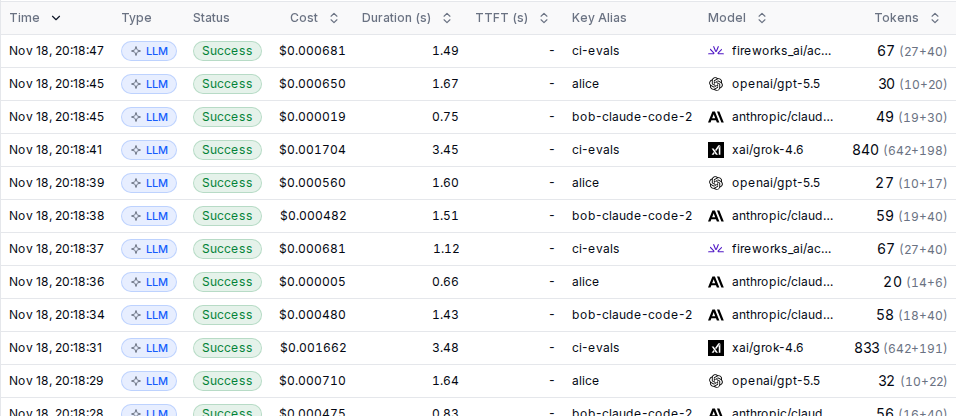
What you get#
- LiteLLM at your VM's private URL, with you as its admin.
- Claude, GPT, Grok, Kimi, and GLM from exe.dev's LLM gateway behind one OpenAI- and Anthropic-compatible API.
- Share the VM, and each person gets their own key and $20 a month on their first request.
- Every request logged with its key, model, cost, and time; prompts aren't stored.
- Restarts after a reboot; nightly backups, with one checked.
What's running, and where
https://my-llm-router.exe.xyz/ui/
LiteLLM's admin UI, behind exe.dev login and your LiteLLM password
https://my-llm-router.exe.xyz/v1
The API, for anyone the VM is shared with, using an exe.dev VM token
Deploy with Shelley#
Click Deploy and Shelley will set up LLM router on a new VM, then check that it works. No config-file wrangling required.
Prefer a terminal?
curl -fsSL \
  https://exe-staging.dev/deploy/llm-router/prompt.txt \
  | ssh exe.dev new --prompt=/dev/stdin
What Shelley is told
Set up LLM router on this VM by following the exe.dev recipe at https://exe-staging.dev/deploy/llm-router.md?via=deploy from top to bottom.

The recipe's example VM name is my-llm-router. This VM's name is the output of `hostname`: use it wherever the recipe writes my-llm-router. Skip the step that creates the VM; you are on it.

You are done when all of these are true. Check each one yourself:
- LiteLLM at your VM's private URL, with you as its admin.
- Claude, GPT, Grok, Kimi, and GLM from exe.dev's LLM gateway behind one OpenAI- and Anthropic-compatible API.
- Share the VM, and each person gets their own key and $20 a month on their first request.
- Every request logged with its key, model, cost, and time; prompts aren't stored.
- Restarts after a reboot; nightly backups, with one checked.

Read the whole recipe, including the closed details. For initial setup,
follow "Install by hand" first, skipping VM creation and SSH: Docker, the
secrets, the model list, the Compose stack, the model check, the owner's
admin account, the backup timer, and the backup check. Those checks are
enough; don't install extra tools to test further. The walkthrough at the
top is for the owner afterwards. Do not run Restore or Update. Keep
exe-auth in front of LiteLLM on port 8000.
Work as exedev in ~/litellm. Never overwrite an existing .env or
config.yaml, and never print the master key or a LiteLLM key.
Make the VM's owner the admin, using the email from the reflection
integration; if it prints nothing, ask the user for their exe.dev email.
Give the owner their sign-up link. Don't create VM tokens, integrations,
or keys for other people: those are the owner's to hand out.
Keep test prompts to a word or two. Don't share the VM or make it public.
Verify docker.service is enabled; do not reboot.

Finish with the URLs I should open.
Also at /deploy/llm-router/prompt.txt. The recipe it follows is /deploy/llm-router.md.
Sign in#
Shelley ends with a sign-up link,
https://my-llm-router.exe.xyz/ui/?invitation_id=.... Open it, set a
password, and you're LiteLLM's admin. Next time, sign in at
https://my-llm-router.exe.xyz/ui/ with your email and that password.
Only you can reach the page: exe.dev asks for your login first.
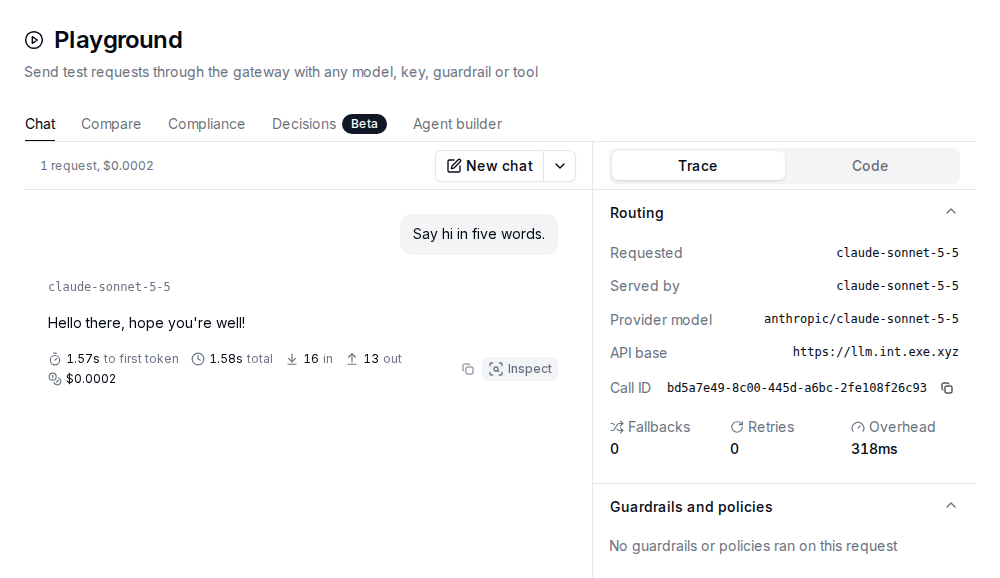
Open Playground, pick a model, and say hello. The trace shows where LiteLLM sent the request, what it cost, and whether it fell back.
Models + Endpoints lists what the router serves; edit
~/litellm/config.yaml to change it (see
Choose the models).
Call it from your computer#
Programs get past the proxy with a VM token. Make one per computer or program, so you can revoke them one at a time. On your computer:
ssh exe.dev ssh-key generate-api-key --vm=my-llm-router \
  --label=llm-router-laptop --exp=90d --json | jq -r .token
That token is all a request needs:
export EXE_TOKEN=exe0....        # the VM token
curl -s https://my-llm-router.exe.xyz/v1/chat/completions \
  -H "X-Exedev-Authorization: Bearer $EXE_TOKEN" \
  -H 'Content-Type: application/json' \
  -d '{"model": "claude-sonnet-5-5", "messages": [{"role": "user", "content": "Say hi."}]}' \
  | jq -r '.choices[0].message.content'
The proxy checks the token, drops it, and tells the router it's yours.
The router answers with your own LiteLLM key, made on your first request,
and the request shows up in Logs under exe:you@example.com. A
request that brings an sk-... key from Virtual Keys uses that key
instead.
OpenAI SDKs#
Any OpenAI-compatible client works with the base URL
https://my-llm-router.exe.xyz/v1 and one extra header. The API key can
be any placeholder that doesn't start with sk-. In Python:
import os
from openai import OpenAI

client = OpenAI(
    base_url="https://my-llm-router.exe.xyz/v1",
    api_key="exe",
    default_headers={"X-Exedev-Authorization": "Bearer " + os.environ["EXE_TOKEN"]},
)
r = client.chat.completions.create(
    model="kimi-k3", messages=[{"role": "user", "content": "Say hi."}]
)
print(r.choices[0].message.content)
The Responses API (client.responses.create), streaming, embeddings
(text-embedding-3-small), and client.models.list() work the same way.
Claude Code#
Claude Code talks to LiteLLM's Anthropic API. Set
these before you start claude:
export ANTHROPIC_BASE_URL=https://my-llm-router.exe.xyz
export ANTHROPIC_AUTH_TOKEN=exe
export ANTHROPIC_CUSTOM_HEADERS="X-Exedev-Authorization: Bearer $EXE_TOKEN"
claude
Codex#
Codex needs a provider in ~/.codex/config.toml:
[model_providers.router]
name = "LLM router"
base_url = "https://my-llm-router.exe.xyz/v1"
wire_api = "responses"
env_http_headers = { "X-Exedev-Authorization" = "EXE_ROUTER_AUTH" }
Then:
export EXE_ROUTER_AUTH="Bearer $EXE_TOKEN"
codex -c model_provider=router -m gpt-5.5
Share it with your team#
Share the VM, and each person gets their own key the first time they use the router. On your computer:
ssh exe.dev share add my-llm-router alice@example.com
Or share it with your whole team with
ssh exe.dev share add my-llm-router team. Alice makes her own VM token
with the generate-api-key command above, on her computer, and follows
the same examples. Her requests run as LiteLLM user alice@example.com,
with a budget of $20 every 30 days.
Everything the router sends through exe.dev's gateway counts against your
exe.dev LLM allocation, so set budgets that fit. To change the default,
edit EXE_AUTH_BUDGET and EXE_AUTH_BUDGET_PERIOD in
~/litellm/compose.yaml and run docker compose up -d there; it applies
to people who haven't used the router yet. For one person, change it in
Internal Users, or on the VM with ~/litellm/api, a helper that calls
LiteLLM's admin API with the master key:
cd ~/litellm
./api /user/update '{"user_id": "alice@example.com", "max_budget": 50}' | jq .data.max_budget
Over budget, her requests fail with ExceededBudget until the period
rolls over. Usage shows spend by person, model, and day; Virtual
Keys can limit a key to certain models; Teams groups people under a
shared budget. To give Alice the admin UI too, invite her in Internal
Users; she gets a sign-up link like yours.
To cut someone off, on your computer,
ssh exe.dev share remove my-llm-router alice@example.com.
Warning
Keep the VM private. If you make it public, anyone signed in to exe.dev gets a key and a budget.
Connect your other VMs#
Programs on your other exe.dev VMs, such as Open WebUI,
LibreChat, or an agent, can reach the router without
a VM token through a peer integration.
On your computer, attach one to the VM that needs the router (my-agent-vm
here):
ssh exe.dev integrations add http-proxy --name llm-router \
  --target https://my-llm-router.exe.xyz/ --peer --attach vm:my-agent-vm
On that VM, the base URL is https://llm-router.int.exe.xyz/v1, with any
placeholder API key; for Claude Code, ANTHROPIC_BASE_URL is
https://llm-router.int.exe.xyz. Leave out the X-Exedev-Authorization
header from the examples above: exe.dev vouches for the VM itself, and
the router gives it a key of its own, exe:vm:my-agent-vm, with the
same default budget.
Choose the models#
~/litellm/config.yaml lists the models. Each entry maps the name
clients ask for to a model at a provider. To add a model from exe.dev's
gateway, copy an entry with the same provider and change the names; on
the VM, curl -s https://llm.int.exe.xyz/models.json | jq -r '.models[].id'
lists what the gateway serves. Then restart LiteLLM:
cd ~/litellm
docker compose restart litellm
It takes about a minute to come back. LiteLLM prices models from its own
list; for one it doesn't know, the log shows $0 and budgets don't count it,
so stick to models it prices or set input_cost_per_token and
output_cost_per_token in the entry's litellm_params.
Add another provider#
For models outside the gateway, keep the provider's key in an exe.dev
integration rather than on the VM. For
OpenRouter,
connect it
with its default name, openrouter, and attach it to the router's VM.
Then add an entry to model_list that sends every openrouter/... model
name there, and restart LiteLLM:
  - model_name: "openrouter/*"
    litellm_params:
      model: "openrouter/*"
      api_base: https://openrouter.int.exe.xyz/api/v1
      api_key: exe-integration
Clients then ask for OpenRouter's model names with openrouter/ in
front, such as openrouter/meta-llama/llama-3.3-70b-instruct, and the log
shows what each one cost. A key without a model list can use any of them,
so give keys a list or a budget. The integration replaces the placeholder
key with yours on the way out, so nothing on the VM, LiteLLM included,
ever holds it. See Agent secrets for how that
works.
Fallbacks and caching#
router_settings in config.yaml names fallbacks: when a model fails
after its retries, LiteLLM tries the next one, and adds an
x-litellm-attempted-fallbacks header to the answer. A key limited to
certain models only falls back to models it's allowed.
To answer identical requests from the cache for ten minutes, add these
lines under litellm_settings: and restart LiteLLM:
  cache: true
  cache_params:
    type: redis
    host: redis
    port: 6379
    ttl: 600
A cached answer costs nothing and carries an x-litellm-cache-key
header. Leave caching off if your team expects a fresh answer every time.
Other routers#
Two other open-source routers are popular, both aimed at one person rather than a team:
- 9router routes coding agents
through your Claude Code, Codex, and Copilot subscriptions, falling back
to cheap and free models. It's an npm package,
9router, that needs Node.js 20.18 or newer and listens on port 20128. Run it on the VM where your agents work and point them athttp://localhost:20128/v1; nothing outside the VM can reach it. - FreeLLMAPI pools the free tiers of many providers behind one OpenAI-compatible key, in Docker. Its README calls it a project for personal experimentation, not production.
Warning
The provider's terms still apply when a router sits in between, and sharing a subscription or a free tier with others often breaks them. Read them first, and keep such a router to yourself.
Keep your data#
People, keys, budgets, and the request log live in PostgreSQL in
~/litellm/postgres, and nightly backups go to ~/litellm/backups. Keep a
copy off the VM. On your computer:
scp -r my-llm-router.exe.xyz:litellm/backups .
Backups hold the master key and the key that encrypts any credentials LiteLLM stores, so keep them private. For updates or trouble, ask Shelley, or open the instructions below.
The nuts and bolts#
Happy clicking Deploy? You can stop here. These are Shelley's setup steps and your maintenance reference.
Install by hand
Create a VM#
On your computer (pick another name if my-llm-router is taken):
ssh exe.dev new --name=my-llm-router
ssh my-llm-router.exe.xyz
The default VM (8 GB) is plenty; LiteLLM uses about 1 GB. All remaining
installation commands run on the VM, as exedev.
Write the secrets#
LiteLLM's master key is the admin key for its API, and its salt key encrypts any provider credentials it stores. This writes them, and PostgreSQL's password, to a file only you can read, once:
mkdir -p ~/litellm && cd ~/litellm
if [ ! -e .env ]; then
  touch .env && chmod 600 .env
  pw=$(openssl rand -hex 24)
  cat >> .env <<EOF
# LiteLLM's secrets. Back this file up: without LITELLM_SALT_KEY, LiteLLM
# can't read the credentials it has stored. Never change the salt key.
LITELLM_MASTER_KEY=sk-$(openssl rand -hex 24)
LITELLM_SALT_KEY=sk-$(openssl rand -hex 24)
POSTGRES_PASSWORD=$pw
DATABASE_URL=postgresql://litellm:$pw@postgres:5432/litellm
EOF
fi
ls -l .env
ls should show -rw-------.
Choose the models#
Every entry goes through exe.dev's LLM gateway, which adds the provider
keys; exe-llm-gateway is a placeholder. Write config.yaml once:
cd ~/litellm
[ -e config.yaml ] || cat > config.yaml <<'EOF'
# LiteLLM's models and settings. Restart after a change:
#   docker compose restart litellm
# The models come from exe.dev's LLM gateway, which supplies the provider
# keys, so api_key is only a placeholder.
model_list:
  # Every Claude model, by its Anthropic name (claude-sonnet-5-5, ...).
  # LiteLLM's model list shows every Claude it knows; the gateway serves
  # the ones in https://llm.int.exe.xyz/models.json.
  - model_name: "claude-*"
    litellm_params:
      model: "anthropic/claude-*"
      api_base: https://llm.int.exe.xyz
      api_key: exe-llm-gateway
  - model_name: gpt-5.5
    litellm_params:
      model: openai/gpt-5.5
      api_base: https://llm.int.exe.xyz/openai/v1
      api_key: exe-llm-gateway
  - model_name: gpt-5.4-mini
    litellm_params:
      model: openai/gpt-5.4-mini
      api_base: https://llm.int.exe.xyz/openai/v1
      api_key: exe-llm-gateway
  - model_name: grok-4.6
    litellm_params:
      model: xai/grok-4.6
      api_base: https://llm.int.exe.xyz/xai/v1
      api_key: exe-llm-gateway
  - model_name: kimi-k3
    litellm_params:
      model: fireworks_ai/accounts/fireworks/models/kimi-k3
      api_base: https://llm.int.exe.xyz/fireworks/inference/v1
      api_key: exe-llm-gateway
  - model_name: glm-5.3
    litellm_params:
      model: fireworks_ai/accounts/fireworks/models/glm-5p3
      api_base: https://llm.int.exe.xyz/fireworks/inference/v1
      api_key: exe-llm-gateway
  - model_name: text-embedding-3-small
    litellm_params:
      model: openai/text-embedding-3-small
      api_base: https://llm.int.exe.xyz/openai/v1
      api_key: exe-llm-gateway

router_settings:
  # When a model fails after its retries, try the next one.
  fallbacks:
    - kimi-k3: [glm-5.3]

litellm_settings:
  num_retries: 2

general_settings:
  master_key: os.environ/LITELLM_MASTER_KEY
  database_url: os.environ/DATABASE_URL
  # People sign in to the UI with their own email and password.
  disable_env_credential_login: true
EOF
Start LiteLLM#
exe.dev's proxy tells the VM who each request is from.
exe-auth.py, a
small program in front of LiteLLM, turns that into a LiteLLM key per
person: a request with no LiteLLM key gets its sender's, made the first
time with a budget of $20 every 30 days. Requests with a key, the UI,
and the admin API pass through. Download it:
cd ~/litellm
curl -fsSLo exe-auth.py https://exe-staging.dev/deploy/llm-router/exe-auth.py
python3 -m py_compile exe-auth.py && echo exe-auth ok
Then write the Compose file:
cd ~/litellm
cat > compose.yaml <<'EOF'
# LiteLLM behind exe.dev's HTTPS proxy and exe-auth, with PostgreSQL for
# keys, budgets, and logs, and Redis for the optional cache. Secrets come
# from .env.
name: litellm

services:
  # In front of LiteLLM: gives each person the VM is shared with a key of
  # their own. See exe-auth.py.
  exe-auth:
    image: ghcr.io/berriai/litellm:v1.110.0
    restart: unless-stopped
    entrypoint: ["python3", "/exe-auth.py"]
    ports:
      - "8000:8000"
    environment:
      LITELLM_MASTER_KEY: ${LITELLM_MASTER_KEY:?set in .env}
      LITELLM_URL: http://litellm:4000
      EXE_AUTH_BUDGET: "20"
      EXE_AUTH_BUDGET_PERIOD: 30d
    volumes:
      - ./exe-auth.py:/exe-auth.py:ro
    depends_on:
      litellm:
        condition: service_healthy

  litellm:
    image: ghcr.io/berriai/litellm:v1.110.0
    restart: unless-stopped
    env_file: .env
    volumes:
      - ./config.yaml:/app/config.yaml:ro
    command: ["--config", "/app/config.yaml", "--port", "4000"]
    depends_on:
      postgres:
        condition: service_healthy
    healthcheck:
      test: ["CMD", "python3", "-c", "import urllib.request; urllib.request.urlopen('http://localhost:4000/health/liveliness')"]
      interval: 15s
      timeout: 5s
      retries: 5
      start_period: 3m

  postgres:
    image: postgres:18
    restart: unless-stopped
    environment:
      POSTGRES_DB: litellm
      POSTGRES_USER: litellm
      POSTGRES_PASSWORD: ${POSTGRES_PASSWORD:?set in .env}
    volumes:
      - ./postgres:/var/lib/postgresql
    healthcheck:
      test: ["CMD", "pg_isready", "-U", "litellm", "-d", "litellm"]
      interval: 10s
      timeout: 5s
      retries: 5

  redis:
    image: redis:8
    restart: unless-stopped
    command: ["redis-server", "--save", "", "--appendonly", "no",
              "--maxmemory", "256mb", "--maxmemory-policy", "allkeys-lru"]
EOF
docker compose config --quiet && echo compose ok
Enable Docker at boot, download the images (about 2 GB), and start. LiteLLM's first start takes a minute while it sets up its database:
sudo systemctl enable --now docker.service
docker compose pull -q
docker compose up -d --wait --wait-timeout 300
curl -fsS localhost:8000/health/liveliness; echo
curl should print "I'm alive!". The HTTPS proxy adds
HTTPS and exe.dev login in front of port 8000.
Write api, a helper for LiteLLM's admin API, and check two models with
the master key:
cd ~/litellm
cat > api <<'EOF'
#!/bin/sh
# Call LiteLLM's admin API with the master key: ./api /path ['{json}']
set -eu
key=$(sed -n 's/^LITELLM_MASTER_KEY=//p' "$(dirname "$0")/.env")
if [ $# -ge 2 ]; then
  exec curl -sS --fail-with-body "http://localhost:8000$1" \
    -H "Authorization: Bearer $key" -H 'Content-Type: application/json' -d "$2"
fi
exec curl -sS --fail-with-body "http://localhost:8000$1" -H "Authorization: Bearer $key"
EOF
chmod 700 api
for m in claude-sonnet-5-5 gpt-5.5; do
  ./api /v1/chat/completions "{\"model\": \"$m\", \"messages\": [{\"role\": \"user\", \"content\": \"Say hi.\"}]}" \
    | jq -r '.model + ": " + .choices[0].message.content'
done
Each model should answer.
Make yourself the admin#
This creates your LiteLLM account as admin, under your exe.dev email:
cd ~/litellm
owner=$(curl -fsS https://reflection.int.exe.xyz/email | jq -r '.email // empty')
echo "owner: $owner"
./api /user/new "$(jq -nc --arg e "$owner" \
  '{user_id: $e, user_email: $e, user_role: "proxy_admin", auto_create_key: false}')" \
  | jq -r '.user_id + " is " + .user_role'
If owner: is empty, run owner=you@example.com with your exe.dev
email, then the ./api line.
You set your password through a sign-up link. LiteLLM records who sent an invitation, so this sends it from you, with a key of yours that it deletes right after. The link works for seven days:
cd ~/litellm
k=$(./api /key/generate "$(jq -nc --arg e "$owner" \
  '{user_id: $e, key_alias: "sign-up", duration: "10m"}')" | jq -r .key)
id=$(curl -sS --fail-with-body localhost:8000/invitation/new -H "Authorization: Bearer $k" \
  -H 'Content-Type: application/json' -d "$(jq -nc --arg e "$owner" '{user_id: $e}')" | jq -r .id)
./api /key/delete "$(jq -nc --arg k "$k" '{keys: [$k]}')" >/dev/null
printf 'Sign up: https://%s.exe.xyz/ui/?invitation_id=%s\n' "$(hostname)" "$id"
Lost the link, or locked out? Set owner and run this block again.
Set up nightly backups#
This dumps LiteLLM's database while it runs, checks the dump, saves it
with .env, config.yaml, and compose.yaml, and keeps two weeks of
backups:
cd ~/litellm
cat > backup.sh <<'EOF'
#!/bin/sh
# Back up LiteLLM: its database, its config, and the .env with its keys.
set -eu
umask 077
cd "$(dirname "$0")"
mkdir -p -m 700 backups
out="backups/litellm-$(date +%Y%m%d-%H%M%S).tar.gz"
work=$(mktemp -d)
trap 'rm -rf "$work"' EXIT
docker compose exec -T postgres pg_dump -U litellm -d litellm -Fc > "$work/litellm.dump"
docker compose exec -T postgres pg_restore --list < "$work/litellm.dump" > /dev/null
cp .env config.yaml compose.yaml exe-auth.py "$work/"
tar -C "$work" -czf "$out.tmp" .
mv "$out.tmp" "$out"
find backups -name 'litellm-*.tar.gz' -mtime +14 -delete
EOF
chmod +x backup.sh

sudo tee /etc/systemd/system/litellm-backup.service >/dev/null <<'EOF'
[Unit]
Description=Back up LiteLLM
After=docker.service

[Service]
Type=oneshot
User=exedev
ExecStart=/home/exedev/litellm/backup.sh
EOF
sudo tee /etc/systemd/system/litellm-backup.timer >/dev/null <<'EOF'
[Unit]
Description=Back up LiteLLM nightly

[Timer]
OnCalendar=daily
Persistent=true

[Install]
WantedBy=timers.target
EOF
sudo systemctl daemon-reload
sudo systemctl enable --now litellm-backup.timer
sudo systemctl start litellm-backup.service
systemctl list-timers litellm-backup.timer
tar -tzf backups/litellm-*.tar.gz
The timer should list its next run, and the archive should hold
litellm.dump, .env, config.yaml, and compose.yaml. You're ready:
open the sign-up link and try the walkthrough above.
Back up and restore
To take an extra backup, on the VM:
cd ~/litellm
./backup.sh
Restore#
Pick an archive in backups/ and substitute its filename below. On a new
VM, run Install by hand first, skipping Make yourself the admin,
and copy your archive into that folder. These commands run on the VM.
They take LiteLLM's keys and config from the backup, keep this VM's
PostgreSQL password, and set the current database aside rather than
delete it:
cd ~/litellm
backup=backups/litellm-YYYYMMDD-HHMMSS.tar.gz
work=$(mktemp -d)
tar -C "$work" -xzf "$backup" &&
docker compose exec -T postgres pg_restore --list < "$work/litellm.dump" >/dev/null &&
sudo systemctl stop litellm-backup.timer litellm-backup.service &&
docker compose stop litellm &&
cp -p .env ".env.before-restore-$(date +%s)" &&
cp -p config.yaml "config.yaml.before-restore-$(date +%s)" &&
for key in LITELLM_MASTER_KEY LITELLM_SALT_KEY; do
  line=$(grep "^$key=" "$work/.env") && sed -i "s|^$key=.*|$line|" .env
done &&
cp "$work/config.yaml" config.yaml &&
docker compose exec -T postgres psql -U litellm -d postgres \
  -c "ALTER DATABASE litellm RENAME TO litellm_before_restore_$(date +%s)" \
  -c "CREATE DATABASE litellm" &&
docker compose exec -T postgres pg_restore -U litellm -d litellm --exit-on-error < "$work/litellm.dump" &&
docker compose up -d --wait --wait-timeout 300 &&
sudo systemctl start litellm-backup.timer &&
rm -rf "$work"
Sign in and check Virtual Keys and Logs. Once you're happy, drop
the set-aside database; list it with
docker compose exec postgres psql -U litellm -d postgres -c '\l', then
docker compose exec postgres dropdb -U litellm litellm_before_restore_....
Update
LiteLLM releases often. Read the
release notes, then change
the image tag in compose.yaml to the new stable release. On the VM,
back up first, then pull and restart; LiteLLM updates its database on
start:
cd ~/litellm
sed -i 's|litellm:v1.110.0|litellm:v1.111.0|' compose.yaml   # the new tag
curl -fsSLo exe-auth.py https://exe-staging.dev/deploy/llm-router/exe-auth.py
./backup.sh && docker compose pull && docker compose up -d --wait --wait-timeout 300
curl -fsS localhost:8000/health/liveliness; echo
To undo an update, put the old tag back and restore the backup you took first.
Something's not happy?
Start with the logs. On the VM:
cd ~/litellm
docker compose ps
docker compose logs --tail=50 litellm
- 502 right after a start? LiteLLM takes about a minute to boot.
- Down after a reboot? Run
sudo systemctl enable --now docker.service. - 401 with an exe.dev login page or no JSON? The request didn't get
past the proxy: the
X-Exedev-Authorizationheader is missing, or the VM token expired or was made for another VM. Authentication Errorin JSON? That's LiteLLM: ansk-...key the request brought is wrong or deleted, or the request came from the VM itself, which the proxy can't vouch for. Leave the key out, or use a placeholder that doesn't start withsk-, to get your own.docker compose logs exe-authshows the keys exe-auth made.Invalid model nameorkey_model_access_denied? The model isn't inconfig.yaml, or the key isn't allowed to use it.- A model fails with a 4xx from the gateway? Check the name in
curl -s https://llm.int.exe.xyz/models.json | jq -r '.models[].id', and that your LLM integration is attached to the VM. ExceededBudget? Raise the budget in Internal Users or Virtual Keys, or wait for it to reset.403 integration not found or not attached? The integration's name in the URL is wrong, or it isn't attached to this VM.- Locked out of the UI? Make a new sign-up link with the second block
of Make yourself the admin. The master key in
.envalways works for the API.
Frequently asked questions#
How is this different from exe.dev's LLM gateway?
The gateway gives every VM of yours keyless access to Claude, GPT, and open models, billed to your account. The router sits in front of it and adds what a team needs: a key and a budget per person, a model list per key, one log of who used what, fallbacks, caching, and other providers next to the gateway's models. It also reaches programs that don't run on exe.dev, like your laptop.
How much does it cost?
LiteLLM is free and open source. You pay for your VM plan; the models use your exe.dev LLM allocation, and budgets decide how much of it each key may spend. Providers you add bill you directly.
Does the router keep our prompts?
No. LiteLLM logs each request's key, model, tokens, cost, and timing, but not the messages, unless you set store_prompts_in_spend_logs: true under general_settings. Everything it keeps is on the VM.
Who can use the router?
You, the people you share the VM with, and the VMs you attach with a peer integration. exe.dev's HTTPS proxy turns everyone else away before they reach LiteLLM, and tells it who each request is from, so each person gets their own key and budget without you making one. LiteLLM keys from Virtual Keys still work, for programs you want to track apart. Don't make the VM public: then anyone signed in to exe.dev would get a key.
Which models can I use?
Any model on exe.dev's gateway: list them on the VM with curl -s https://llm.int.exe.xyz/models.json | jq -r '.models[].id'. Add any provider LiteLLM supports, too: OpenRouter, Groq, Gemini, Bedrock, Azure, or an Ollama server, with its key kept in an exe.dev integration.
What about 9router or FreeLLMAPI?
Both are popular routers built for one person: 9router mixes your Claude Code, Codex, and Copilot subscriptions with cheap and free models, and FreeLLMAPI pools free tiers. See other routers for running them on a VM, and check each provider's terms first.
Is LiteLLM's admin UI free?
Yes: keys, budgets, users, teams, logs, and usage charts are all in the MIT-licensed proxy. Single sign-on, audit-log exports, and some guardrails are enterprise features with their own license.
Published Nov 19, 2026 · Updated Nov 19, 2026 · tested end to end Nov 19, 2026 · Markdown · manifest.json · Something wrong? Tell us