
Self-host Payload CMS
Payload's admin, API, and Next.js site on a computer of their own.
Shelley handles the setup. About 15 minutes.
Prefer a terminal?
curl -fsSL https://exe-staging.dev/deploy/payload/prompt.txt | ssh exe.dev new --prompt=/dev/stdinPayload is a headless CMS that is also a Next.js app: the admin panel,
the REST and GraphQL APIs, and your website run as one server, from code
you own. That makes it a good fit for a VM of its own. Here it runs
Payload's website template with next start around the clock, the
content in SQLite and the uploads in plain files on a persistent disk,
with nightly backups. The VM is private until you share it, and even
when the site is public, /admin opens only for people signed in to
exe.dev, and your editors land in Payload already signed in. Payload's email goes out
through exe.dev with no mail provider, the SEO fields get an
Auto-generate button backed by exe.dev's LLM gateway with no API key,
and Shelley works on the VM next to the code, so you can ask it for a
new collection and see it in the admin a few minutes later.

What you get#
- Payload 3.94 with the website template (pages, posts, media, forms, search, SEO) answering on port 8000, restarting after a reboot.
- Content in SQLite and uploads in ~/data, backed up every night and before every deploy.
- /admin and the login APIs open only to people signed in to exe.dev, who are signed in to Payload by their email.
- Payload's email (password resets, form notifications) sent through exe.dev, and an Auto-generate button for meta descriptions that uses the LLM gateway.
- ~/payload as the place to change the code, a dev server on port 3000, and ~/bin/payload-deploy to migrate, build, and switch with rollback.
What's running, and where
https://my-payload.exe.xyz/
the website and the content API, until you make them public
https://my-payload.exe.xyz/admin
Payload's admin, only for people signed in to exe.dev, even when the site is public
https://my-payload.exe.xyz:3000/
the dev server, when you start it, with its own database
Deploy with Shelley#
Click Deploy and Shelley will set up Payload on a new VM, then check that it works. No config-file wrangling required.
Prefer a terminal?
curl -fsSL \
  https://exe-staging.dev/deploy/payload/prompt.txt \
  | ssh exe.dev new --prompt=/dev/stdin
What Shelley is told
Set up Payload on this VM by following the exe.dev recipe at https://exe-staging.dev/deploy/payload.md?via=deploy from top to bottom.

The recipe's example VM name is my-payload. This VM's name is the output of `hostname`: use it wherever the recipe writes my-payload. Skip the step that creates the VM; you are on it.

You are done when all of these are true. Check each one yourself:
- Payload 3.94 with the website template (pages, posts, media, forms, search, SEO) answering on port 8000, restarting after a reboot.
- Content in SQLite and uploads in ~/data, backed up every night and before every deploy.
- /admin and the login APIs open only to people signed in to exe.dev, who are signed in to Payload by their email.
- Payload's email (password resets, form notifications) sent through exe.dev, and an Auto-generate button for meta descriptions that uses the LLM gateway.
- ~/payload as the place to change the code, a dev server on port 3000, and ~/bin/payload-deploy to migrate, build, and switch with rollback.

Read the whole recipe, including the closed details. For initial setup,
follow "Set up by hand" from "Install Node.js" to the end of it, as
exedev; the walkthrough sections are for the owner afterwards. Use the
exact versions given. Never overwrite an existing ~/payload.env or
~/payload/.env. Don't create Payload users, don't press or call "Seed
your database", don't make the VM public, and don't run Restore or
Update. Do not reboot. If a build fails, read its output and fix what
you can; never commit secrets. Finish with
https://<vm>.exe.xyz/admin and ask the owner to open it and create the
first user with the email of their exe.dev account. Don't paste
secrets into the chat; say they are in ~/payload.env.

Finish with the URLs I should open.
Also at /deploy/payload/prompt.txt. The recipe it follows is /deploy/payload.md.
Create your admin account#
Open https://my-payload.exe.xyz/admin. You'll sign in to exe.dev if
you haven't, then land on Payload's Create first user form. Use the
email of your exe.dev account, a strong password, and your name.
Nobody else can reach the form, because the VM is private. From then on,
opening /admin signs you in to Payload by that email; the password is
a fallback (see Who can sign in).
The dashboard offers Seed your database. It fills the site with demo pages, posts, images, and a contact form, which is the quickest way to see what the template does. It also deletes every page, post, category, form, and upload first, so press it now or never.
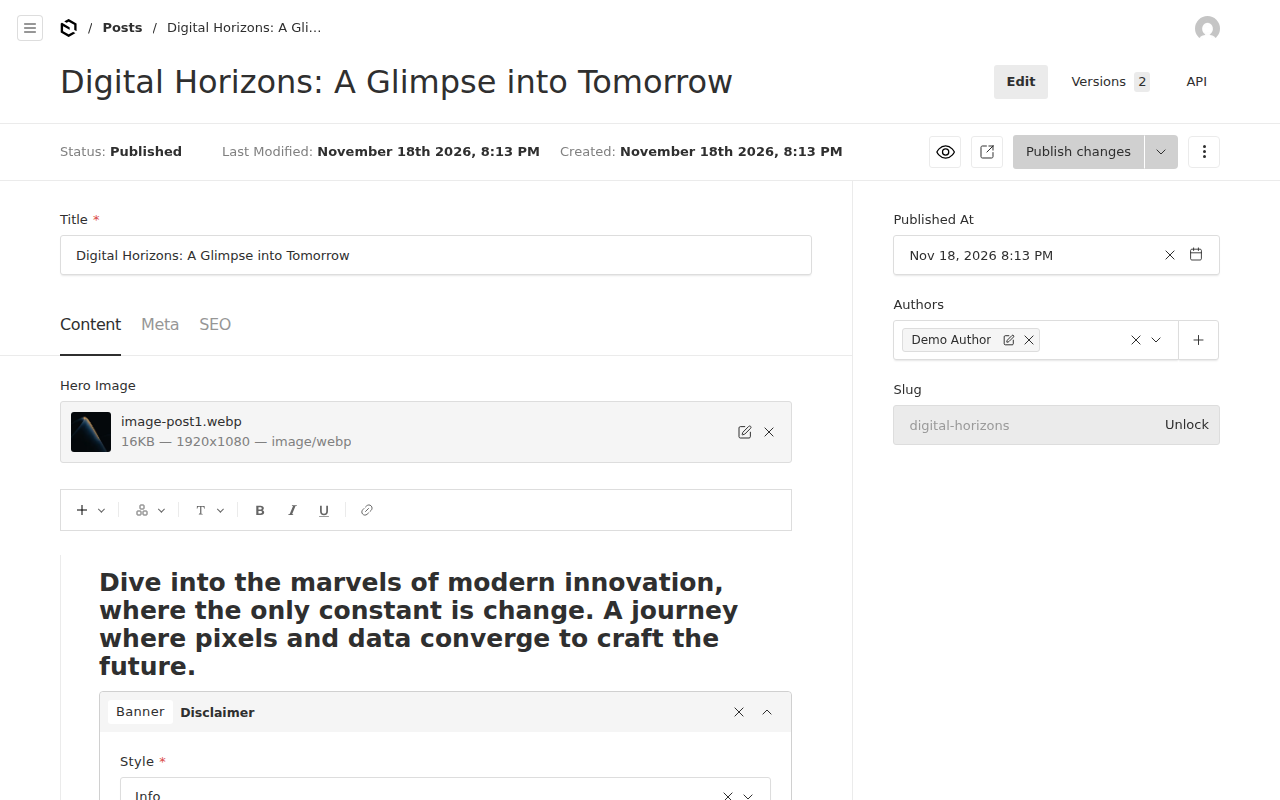
Then open https://my-payload.exe.xyz/ for the site. Pages are built from blocks (hero, content, media, call to action, archive, form), posts have categories and authors, and drafts get live preview. Published changes show up on the site at once: the template revalidates the pages they touch.
Read the content API#
Every collection has a REST API at /api/<collection> and there is
GraphQL at /api/graphql. Published posts are readable by anyone who
can reach the VM; drafts and the users collection need a Payload login.
While the VM is private, a program reaching it from outside (a static site build, a mobile app in development, a script) needs a VM token. On your computer:
ssh exe.dev ssh-key generate-api-key --vm=my-payload --label=payload-api --exp=30d
It prints a token starting with exe1.. Send it in the
X-Exedev-Authorization header (-g stops curl from reading the
brackets as a pattern):
TOKEN=exe1.paste-yours-here
curl -g -H "X-Exedev-Authorization: Bearer $TOKEN" \
  'https://my-payload.exe.xyz/api/posts?limit=3&select[title]=true&select[slug]=true'
The answer is JSON: {"docs":[{"id":3,"title":"...","slug":"..."},...],"totalDocs":3,...}.
exe.dev's proxy checks the token, removes it, and passes the request on
as coming from you, so the API sees your exe.dev email and Payload signs
the request in as your user. That's convenient for scripts that write
content (POST /api/posts), and it means the token can do whatever you
can in Payload: give it only to programs you trust, and keep --exp
short. On a public site, reads need no token at all.
Code on the VM can skip HTTP and use Payload's Local
API (getPayload),
which is what the template's pages do.
Who can sign in#
There are two locks on the admin. The first is exe.dev's:
proxy.ts, a Next.js proxy (the
file formerly called middleware), lets requests for /admin,
/api/users, and /api/graphql through only if they come from someone
signed in to exe.dev, and sends everyone else to exe.dev's sign-in
page. exe.dev's proxy adds the signed-in email to each request as
X-ExeDev-Email and removes any copy a visitor sends, so the header
can't be faked. The second lock is Payload's own login, and
exedev-auth.ts, a Payload
auth strategy
of 20 lines, unlocks it for you: a request whose exe.dev email matches a
Payload user is signed in as that user. Anyone else signed in to exe.dev
gets Payload's login form and needs a password.
To add an editor, create their Payload user under Users → Create New with the email of their exe.dev account (they can sign up for free), and while the site is private, share it with them. On your computer:
ssh exe.dev share add my-payload editor@example.com
They open /admin and are in, with no password to remember. What they
can do there is up to Payload's access
control; in the
template every user can edit everything, and Shelley can add roles.
Make it public#
When the site is ready, on your computer:
ssh exe.dev share set-public my-payload
Now anyone can read https://my-payload.exe.xyz/ and the published
content in /api, and /admin still sends them to exe.dev's sign-in.
To take it private again: ssh exe.dev share set-private my-payload.
The site and the admin share port 8000 on purpose. exe.dev makes one port of a VM public, and the admin calls the API on its own origin, so splitting them would mean a second VM or a second domain. Instead, the proxy gate decides per path. Everything else works as on any public Payload: the contact form's submissions are open to everyone, as forms are, and Payload's access rules decide what the API shows.
To use your own domain, point it at the VM as the custom domain
guide explains (ssh exe.dev domain add my-payload www.example.com), then tell Payload its address. On the VM:
sed -i 's|^NEXT_PUBLIC_SERVER_URL=.*|NEXT_PUBLIC_SERVER_URL=https://www.example.com|' ~/payload.env
~/bin/payload-deploy
NEXT_PUBLIC_SERVER_URL is built into the site (for canonical links,
the sitemap, and CORS), so it takes a deploy, not just a restart.
Change the content model with Shelley#
In Payload, the content model is TypeScript: collections, fields, access
rules, and hooks live in ~/payload/src, in git. Shelley runs on the
VM next to that code, and ~/payload/AGENTS.md tells it how this
project is built and deployed. Ask it, for example:
Add an Events collection with a title, a date, a location, and a rich text description, show upcoming events on a new /events page, and deploy it.
Shelley edits the config and tries it on the dev server, a second
Payload at https://my-payload.exe.xyz:3000/ with its own database
(~/payload/dev.db) that reloads as the code changes. Port 3000 is
always private. Then it creates a migration for the schema change,
commits, and runs ~/bin/payload-deploy, which backs up the database,
applies the migration, builds, and switches to the new version, or
leaves the old one running if anything fails. The same steps by hand,
on the VM:
sudo systemctl start payload-dev   # https://my-payload.exe.xyz:3000/admin
cd ~/payload
# ...edit src/collections, then:
pnpm generate:types
pnpm payload migrate:create add_events
git add -A && git commit -m "Add events"
~/bin/payload-deploy
sudo systemctl stop payload-dev
Never edit the live database's schema by hand: Payload compares the
config with the last migration's snapshot in src/migrations, and the
two have to agree. To try changes against real content, copy it into the
dev database first:
sqlite3 ~/data/payload.db ".backup $HOME/payload/dev.db"
cp -a ~/data/media/. ~/payload/public/media/
To work from your own computer instead, clone the project over SSH
(git clone my-payload.exe.xyz:payload), and push back to a branch;
deploys still happen on the VM.
Email#
Payload sends email for password resets, and the template's form
builder can email each form submission.
exedev-email.ts, a
Payload email adapter of 50 lines, sends it through exe.dev's email
gateway: no mail server, no provider, no password.
The gateway is for you, not your visitors: it delivers plain text (the
adapter turns Payload's HTML into text and keeps the links) to you, your
exe.dev team, and people you've shared the VM with, and it's
rate-limited. So a contact form that emails you works; a confirmation
to the visitor who filled it in doesn't, and the error shows in
journalctl -u payload.
To email anyone else (customers, members, newsletters), use a mail
provider with Payload's Nodemailer
adapter: pnpm add @payloadcms/email-nodemailer@3.94.0, put the SMTP host and password in
~/payload.env, and replace email: exedevEmail in
src/payload.config.ts. exe.dev VMs can connect out to SMTP servers on
ports 465 and 587. For a provider with an HTTP API (Resend has a
Payload adapter), you can keep the key off the VM: add it as an
http-proxy integration and point the
adapter at the integration's address. Ask Shelley to set it up and send
a test.
Write meta descriptions with AI#
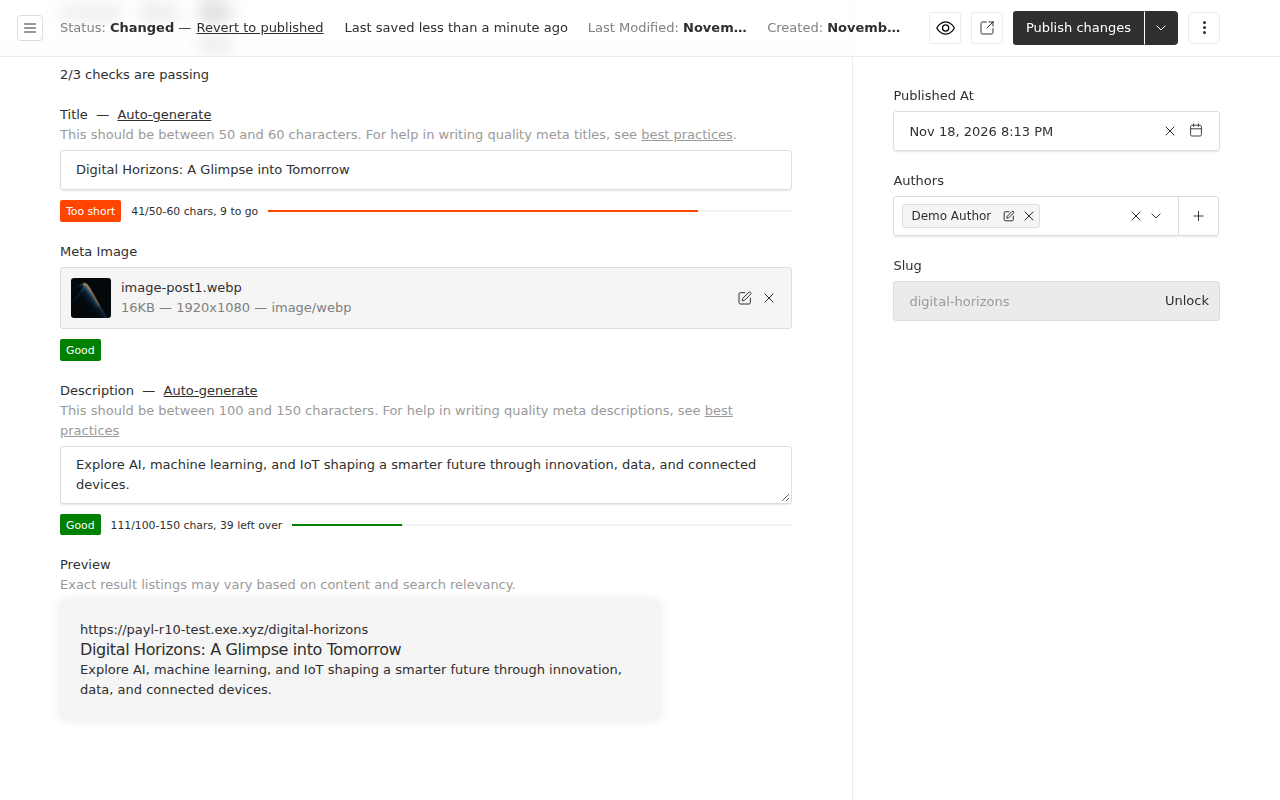
The template's SEO tab has an Auto-generate button for the title;
exedev-ai.ts adds one for
the description. It sends the page's title and text to exe.dev's LLM
gateway, which needs no API key on the VM and
counts against your exe.dev plan. The model is gpt-5.4-mini unless you
set LLM_MODEL in ~/payload.env (and redeploy); curl -s https://llm.int.exe.xyz/v1/models on the VM lists the others.
The same pattern works anywhere in Payload: a hook that drafts alt text for uploads, a field that translates, a job that summarizes form submissions. Payload's MCP plugin goes the other way and lets an AI assistant read and write your collections through the API.
Uploads on disk or in S3#
Uploads go to ~/data/media on the VM's disk, outside the code, so
deploys never touch them and the backup carries them. Payload serves
them at /api/media/file/<name> with its own access rules, and
next/image resizes them for the site. A VM's disk holds many
gigabytes; check with df -h / and grow it with ssh exe.dev resize my-payload --disk=50GB.
To keep them in S3 (or R2, or any S3-compatible store) instead, add Payload's S3 storage adapter:
// src/payload.config.ts, after pnpm add @payloadcms/storage-s3@3.94.0
import { s3Storage } from '@payloadcms/storage-s3'
// in plugins: [...plugins, s3Storage({ ... })]
s3Storage({
  collections: { media: true },
  bucket: process.env.S3_BUCKET!,
  config: {
    region: process.env.S3_REGION,
    endpoint: process.env.S3_ENDPOINT, // for R2 and other S3-compatible stores
    credentials: {
      accessKeyId: process.env.S3_ACCESS_KEY_ID!,
      secretAccessKey: process.env.S3_SECRET_ACCESS_KEY!,
    },
  },
})
Put the five values in ~/payload.env and deploy. Existing files stay on
disk; upload them again, or ask Shelley to copy them over.
Use PostgreSQL instead#
Pick the database before you write content: switching later means moving the content yourself. Set up PostgreSQL on exe.dev on this VM, then create a database for production and one for the dev server. On the VM:
~/postgres/create-db.sh payload
~/postgres/create-db.sh payload_dev
cd ~/payload
pnpm remove @payloadcms/db-sqlite
pnpm add @payloadcms/db-postgres@3.94.0
In src/payload.config.ts, import postgresAdapter from
@payloadcms/db-postgres and replace the db: entry with
postgresAdapter({ pool: { connectionString: process.env.DATABASE_URL } }).
Put the DATABASE_URL from ~/postgres/payload.env in
~/payload.env and the one from ~/postgres/payload_dev.env in
~/payload/.env. The SQLite migrations don't apply to PostgreSQL, so
start them over, then deploy:
rm -r src/migrations
pnpm payload migrate:create initial
git add -A && git commit -m "Use PostgreSQL"
~/bin/payload-deploy
Add After=postgresql.service to [Unit] in
/etc/systemd/system/payload.service and run sudo systemctl daemon-reload, so Payload starts after the database at boot.
payload-backup sees the postgresql:// URL and saves the database
with pg_dump. Or ask Shelley to do all of this.
Try changes on a copy#
Before a big change (a new content model, a Payload upgrade, a redesign), copy the whole VM and try it there. The copy has its own disk, so nothing you do there reaches the live site. On your computer:
ssh exe.dev cp my-payload my-payload-staging
ssh exe.dev share set-private my-payload-staging
The copy takes the original's sharing, so if your site is public, make
the copy private right away. Then give it its own address and rebuild.
On the copy (ssh my-payload-staging.exe.xyz):
sed -i "s|^NEXT_PUBLIC_SERVER_URL=.*|NEXT_PUBLIC_SERVER_URL=https://$(hostname).exe.xyz|" ~/payload.env
sed -i "s|^NEXT_PUBLIC_SERVER_URL=.*|NEXT_PUBLIC_SERVER_URL=https://$(hostname).exe.xyz:3000|" ~/payload/.env
~/bin/payload-deploy
Now https://my-payload-staging.exe.xyz/ is a private twin with the same content and users. Make the change there, and when it works, carry the commits over to the live VM. On your computer:
git clone my-payload-staging.exe.xyz:payload payload-staging
git -C payload-staging push my-payload.exe.xyz:payload HEAD:staging
Then on the live VM, cd ~/payload && git merge staging && ~/bin/payload-deploy applies the same migrations to the live content.
Delete the copy with ssh exe.dev rm my-payload-staging. Dev, test, and prod on
exe.dev has more on working this way.
Keep your content#
Every night, and before every deploy, ~/bin/payload-backup saves the
database, the uploads, ~/payload.env, and the whole git history of
~/payload to ~/backups; the newest 14 of each kind stay. A backup on
the same disk won't survive losing the VM, so keep a copy off the
VM. On your computer:
scp -r my-payload.exe.xyz:backups payload-backups
The backups hold your secrets and every user's password hash, so keep
them private. exe.dev's VM backups (in preview) can
also copy the whole disk to your own S3 bucket, and Litestream can
stream every change to the database off the VM as it happens; see
SQLite on exe.dev. Run
~/bin/payload-backup on the VM before anything risky. To restore, see
Restore a backup.
Something odd? On the VM, journalctl -u payload -n 50 usually explains
it, or ask Shelley to look.
The nuts and bolts#
Everything below is what Shelley runs to set up the VM. Read it to see how the pieces fit, or run it yourself.
Set up by hand
Create the VM#
On your computer (pick another name if my-payload is taken):
ssh exe.dev new --name=my-payload
ssh my-payload.exe.xyz
Everything else runs on the VM, as exedev.
Install Node.js#
Payload 3.94 needs Node.js 22.23.5 or 24.22.3 or later, and pnpm 9 to 11. Install Node.js 24, the current LTS release, from NodeSource's apt repository, and pnpm 11 through Corepack:
curl -fsSL https://deb.nodesource.com/setup_24.x | sudo -E bash -
sudo apt-get install -y nodejs sqlite3
sudo npm install -g corepack
sudo corepack enable
corepack install -g pnpm@11.28.12
node --version; pnpm --version
Expect v24. (22.3 or later) and 11.28.12. Corepack's own default
would be pnpm 12, which Payload's engines field turns away. sqlite3
is for backups and for looking at the database.
Create the project#
create-payload-app copies the website template at the same version as
the packages it installs, and makes ~/payload a git repository:
cd ~
npx -y create-payload-app@3.94.0 --branch v3.94.0 -n payload -t website \
  --db sqlite --db-connection-string file:/home/exedev/payload/dev.db \
  --use-pnpm --no-agent
cd ~/payload
corepack use pnpm@11.28.12
It takes two or three minutes. corepack use writes the pnpm version
into package.json, so every install uses the same one. A warning that
"the pnpm field in package.json is no longer read" is harmless.
Add the exe.dev pieces#
Four small files from this page, and one-line edits that wire them in:
sign-in by exe.dev email, the gate for /admin, email through exe.dev,
and AI meta descriptions. The edits also let uploads live outside the
code, show the description's Auto-generate button, and let the dev
server answer on the VM's address.
cd ~/payload
curl -fsSL -o src/collections/Users/exedev-auth.ts https://exe-staging.dev/deploy/payload/exedev-auth.ts
curl -fsSL -o src/proxy.ts https://exe-staging.dev/deploy/payload/proxy.ts
curl -fsSL -o src/exedev-email.ts https://exe-staging.dev/deploy/payload/exedev-email.ts
curl -fsSL -o src/plugins/exedev-ai.ts https://exe-staging.dev/deploy/payload/exedev-ai.ts
sed -i -e "/^import { authenticated }/a import { exedevAuth } from './exedev-auth'" \
  -e 's/^  auth: true,$/  auth: { strategies: [exedevAuth] },/' src/collections/Users/index.ts
sed -i "s|staticDir: path.resolve(dirname, '../../public/media'),|staticDir: process.env.PAYLOAD_MEDIA_DIR \|\| path.resolve(dirname, '../../public/media'),|" src/collections/Media.ts
sed -i -e "/^import { plugins } from/a import { exedevEmail } from './exedev-email'" \
  -e 's/^  editor: defaultLexical,$/  editor: defaultLexical,\n  email: exedevEmail,/' src/payload.config.ts
sed -i -e "/^import { getServerSideURL }/a import { generateDescription } from './exedev-ai'" \
  -e 's/^    generateTitle,$/    generateTitle,\n    generateDescription,/' src/plugins/index.ts
sed -i 's/^            MetaDescriptionField({}),$/            MetaDescriptionField({ hasGenerateFn: true }),/' \
  src/collections/Pages/index.ts src/collections/Posts/index.ts
sed -i -e "/^import type { NextConfig }/a import os from 'os'" \
  -e 's/^const nextConfig: NextConfig = {$/const nextConfig: NextConfig = {\n  allowedDevOrigins: [`${os.hostname()}.exe.xyz`],/' next.config.ts
printf '\n# dev server database\n/dev.db*\n' >> .gitignore
git status --short; git diff --stat
Expect four new files under src and 9 files changed, 16 insertions(+), 5 deletions(-) (package.json is from corepack use).
Fewer means a pattern didn't match: look at that file and make the
change by hand.
Don't set serverURL in payload.config.ts. With it, Payload hands out
upload URLs with the full address, and next/image on the VM refuses
to fetch those; the template's relative URLs work everywhere.
Write the settings#
Production reads ~/payload.env, outside the code; the dev server reads
~/payload/.env, which git ignores. Each gets its own secret and its
own database. This leaves existing files alone:
mkdir -p ~/data/media ~/releases ~/backups ~/bin
host=$(hostname).exe.xyz
umask 077
[ -e ~/payload.env ] || cat > ~/payload.env <<EOF
DATABASE_URL=file:/home/exedev/data/payload.db
PAYLOAD_MEDIA_DIR=/home/exedev/data/media
PAYLOAD_SECRET=$(openssl rand -hex 32)
NEXT_PUBLIC_SERVER_URL=https://$host
CRON_SECRET=$(openssl rand -hex 32)
PREVIEW_SECRET=$(openssl rand -hex 32)
EOF
grep -q "^NEXT_PUBLIC_SERVER_URL=https://$host:3000" ~/payload/.env || cat > ~/payload/.env <<EOF
DATABASE_URL=file:/home/exedev/payload/dev.db
PAYLOAD_SECRET=$(openssl rand -hex 32)
NEXT_PUBLIC_SERVER_URL=https://$host:3000
CRON_SECRET=$(openssl rand -hex 32)
PREVIEW_SECRET=$(openssl rand -hex 32)
EOF
umask 022
chmod 600 ~/payload.env ~/payload/.env
stat -c '%a %n' ~/payload.env ~/payload/.env
Expect 600 for both. create-payload-app wrote a .env with a short
secret and no address; the second command replaces it, once.
PAYLOAD_SECRET signs Payload's logins and NEXT_PUBLIC_SERVER_URL is
the address the site links to; the template uses the other two for its
scheduled publishing and draft previews.
Tell Shelley about the project#
AGENTS.md is where Shelley (and other coding agents) look first:
cat > ~/payload/AGENTS.md <<'EOF'
# Payload on exe.dev

A Payload 3 project (website template, Next.js 16, SQLite), set up from
https://exe.dev/deploy/payload. Payload docs: https://payloadcms.com/docs

- Production: payload.service runs `next start` on port 8000 from ~/current,
  a release that ~/bin/payload-deploy built from the committed HEAD of this
  repository. Settings: ~/payload.env (never commit it). Database:
  ~/data/payload.db. Uploads: ~/data/media. Logs: journalctl -u payload.
- Dev server: `sudo systemctl start payload-dev` runs `pnpm dev` here, at
  https://<hostname>.exe.xyz:3000/, with .env and dev.db. Payload pushes
  schema changes to dev.db by itself. Stop it when done.
- Schema changes: edit src/, run `pnpm generate:types`, then
  `pnpm payload migrate:create <name>`, read the migration, commit, and run
  ~/bin/payload-deploy (backup, migrate, build, switch, health check,
  rollback). Never edit applied migrations or the production schema by hand.
  After adding admin components, run `pnpm generate:importmap`.
- exe.dev: requests carry X-ExeDev-Email for signed-in users.
  src/collections/Users/exedev-auth.ts signs them in by email; src/proxy.ts
  keeps /admin, /api/users and /api/graphql for them. Email goes through
  src/exedev-email.ts (exe.dev's gateway: the VM's owner, team and shared
  users only). LLM calls go to https://llm.int.exe.xyz/v1 with no API key.
- Never press or call "Seed your database": it deletes all content.
EOF
Create the first migration#
Production applies the schema through migrations. Create the first one from the config and commit everything:
cd ~/payload
pnpm payload migrate:create initial
git add -A
git commit -qm "Set up for exe.dev"
git log --oneline
Expect two commits, feat: initial commit from create-payload-app and
yours, and src/migrations with the initial migration.
Add the deploy and backup scripts#
payload-deploy builds a
commit of ~/payload in a new directory under ~/releases while the
running version keeps serving: pnpm install, a backup, payload migrate, next build. Then it points ~/current at it, restarts
payload.service, and checks that the site answers, putting the old
release back if anything fails. It keeps three releases.
payload-backup saves the
database (SQLite through .backup, safe while Payload writes, and
checked; PostgreSQL through pg_dump), the uploads, ~/payload.env,
and a git bundle of ~/payload to ~/backups/payload-<kind>-<time>.tar.gz,
keeping the 14 newest of each kind.
curl -fsSL -o ~/bin/payload-deploy https://exe-staging.dev/deploy/payload/payload-deploy
curl -fsSL -o ~/bin/payload-backup https://exe-staging.dev/deploy/payload/payload-backup
chmod +x ~/bin/payload-deploy ~/bin/payload-backup
Add the services#
payload.service runs the current release on port 8000, on localhost
only (exe.dev's proxy reaches it there). payload-dev.service runs the
dev server on port 3000 when you start it; it isn't enabled, so it
doesn't run after a reboot. The timer takes a backup every night.
sudo tee /etc/systemd/system/payload.service >/dev/null <<'EOF'
[Unit]
Description=Payload CMS (production, port 8000)
After=network-online.target
Wants=network-online.target

[Service]
User=exedev
WorkingDirectory=/home/exedev/current
Environment=NODE_ENV=production PORT=8000 NODE_OPTIONS=--no-deprecation NEXT_TELEMETRY_DISABLED=1
EnvironmentFile=/home/exedev/payload.env
ExecStart=/home/exedev/current/node_modules/.bin/next start --hostname 127.0.0.1
Restart=always
RestartSec=3
TimeoutStopSec=30

[Install]
WantedBy=multi-user.target
EOF
sudo tee /etc/systemd/system/payload-dev.service >/dev/null <<'EOF'
[Unit]
Description=Payload CMS dev server (port 3000)

[Service]
User=exedev
WorkingDirectory=/home/exedev/payload
Environment=PORT=3000 NEXT_TELEMETRY_DISABLED=1 COREPACK_ENABLE_DOWNLOAD_PROMPT=0
ExecStart=/usr/bin/pnpm dev
EOF
sudo tee /etc/systemd/system/payload-backup.service >/dev/null <<'EOF'
[Unit]
Description=Back up Payload's database, uploads, settings and code

[Service]
Type=oneshot
User=exedev
ExecStart=/home/exedev/bin/payload-backup nightly
EOF
sudo tee /etc/systemd/system/payload-backup.timer >/dev/null <<'EOF'
[Unit]
Description=Back up Payload every night

[Timer]
OnCalendar=*-*-* 03:00:00 UTC
RandomizedDelaySec=30m
Persistent=true

[Install]
WantedBy=timers.target
EOF
sudo systemctl daemon-reload
sudo systemctl enable payload.service
sudo systemctl enable --now payload-backup.timer
Deploy and check#
The first deploy installs packages, creates the database, and builds, in two to three minutes:
~/bin/payload-deploy
Expect ==> Deployed <commit>: HTTP 200 at https://<vm>.exe.xyz at the
end. Then check the pieces, on the VM:
systemctl is-active payload
curl -s -o /dev/null -w '%{http_code}\n' http://localhost:8000/
curl -s 'http://localhost:8000/api/posts?limit=1' | head -c 60; echo
curl -s -o /dev/null -w '%{http_code} %{redirect_url}\n' http://localhost:8000/admin
curl -s -o /dev/null -w '%{http_code}\n' -H 'X-ExeDev-Email: you@example.com' http://localhost:8000/admin
curl -s -H 'X-ExeDev-Email: you@example.com' http://localhost:8000/api/users/me; echo
curl -s -o /dev/null -w '%{http_code}\n' https://llm.int.exe.xyz/v1/models
ls ~/backups
Expect active; 200; {"docs":[],"hasNextPage":false,...; 307 and
a link to /__exe.dev/login (no exe.dev sign-in, so the gate
redirects); 200 with an email; {"user":null,"message":"Account"}
(no Payload user yet); 200 from the LLM gateway; and one
payload-deploy- backup.
Restore a backup
Each backup in ~/backups is a tarball with data/payload.db (or
data/payload.dump for PostgreSQL), data/media, payload.env, and
payload.bundle, the whole git history of ~/payload.
On the same VM#
Put the database and uploads back as they were. Take a backup of the present state first, in case you want it back. On the VM:
~/bin/payload-backup manual
b=~/backups/payload-nightly-20261118-031207.tar.gz   # the one you want
rm -rf /tmp/restore && mkdir /tmp/restore && tar -xzf "$b" -C /tmp/restore
sudo systemctl stop payload
rm -f ~/data/payload.db-wal ~/data/payload.db-shm
cp /tmp/restore/data/payload.db ~/data/payload.db
rsync -a --delete /tmp/restore/data/media/ ~/data/media/
sudo systemctl start payload
If the backup is older than your latest schema change, also deploy the
commit from that time (~/bin/payload-deploy <commit>), or run
~/bin/payload-deploy to migrate the restored database forward.
On a new VM#
Create the VM and install Node.js as in Set up by hand,
copy the backup over (scp payload-nightly-....tar.gz my-new-vm.exe.xyz:),
then on the new VM:
mkdir -p ~/data ~/releases ~/backups ~/bin /tmp/restore
tar -xzf ~/payload-nightly-*.tar.gz -C /tmp/restore
git clone -q /tmp/restore/payload.bundle ~/payload
(cd ~/payload && pnpm install)
cp /tmp/restore/data/payload.db ~/data/
cp -a /tmp/restore/data/media ~/data/
install -m 600 /tmp/restore/payload.env ~/payload.env
sed -i "s|^NEXT_PUBLIC_SERVER_URL=.*|NEXT_PUBLIC_SERVER_URL=https://$(hostname).exe.xyz|" ~/payload.env
Then follow Set up by hand from "Write the settings"
(it keeps the restored ~/payload.env and writes a new dev .env),
skipping "Create the first migration", and deploy.
Update Payload and Node.js
Payload releases often, and all its packages share one version number. Read the release notes first, and try big jumps on a copy. To move every Payload package to the same new version, on the VM:
cd ~/payload
v=3.95.0   # the version you want
pnpm add $(node -p "Object.keys(require('./package.json').dependencies).filter(n => n === 'payload' || n.startsWith('@payloadcms/')).map(n => n + '@$v').join(' ')")
pnpm payload migrate:create update_payload   # only writes a file if the schema changed
git add -A && git commit -m "Payload $v"
~/bin/payload-deploy
If Payload's new version needs a newer Next.js, pnpm add says so;
add next@<version> to the same command. A Next.js or React update on
its own is the same: pnpm add next@<version>, commit, deploy. If the
deploy fails, the old release keeps running and the backup it took is in
~/backups.
Node.js gets security fixes with sudo apt update && sudo apt upgrade,
then sudo systemctl restart payload. For a new major version, change
the number in NodeSource's setup_ URL, install, and deploy again.
Something not working?
Images on the site are broken, and /_next/image says "url
parameter is not allowed". Something made upload URLs absolute,
usually serverURL in payload.config.ts. Remove it and deploy:
next/image only fetches local paths like /api/media/file/....
/admin keeps sending me to exe.dev's sign-in. The gate in
src/proxy.ts needs the X-ExeDev-Email header, which only exe.dev's
proxy sets. Open the site at https://<vm>.exe.xyz, not through
another proxy or tunnel, and sign in to exe.dev.
I'm signed in to exe.dev but Payload asks for a password. No Payload user has your exe.dev email. Sign in with your password and change your email under your account, or ask someone who can get in to add you.
The API answers Sign in to exe.dev first. That's the gate, for
/api/users and /api/graphql. Send a VM token,
or use the REST API for the rest.
I changed ~/payload.env and nothing happened. NEXT_PUBLIC_*
values are built in: run ~/bin/payload-deploy. Other values need only
sudo systemctl restart payload.
The dev server at :3000 shows a blank admin, or "Blocked cross-origin
request". Check allowedDevOrigins in next.config.ts and
NEXT_PUBLIC_SERVER_URL with :3000 in ~/payload/.env, then
sudo systemctl restart payload-dev. Its log is journalctl -u payload-dev -f.
A deploy fails at payload migrate. Read the error: usually a
migration that doesn't fit the data, like a new required field on a
collection that has documents. Give the field a defaultValue, or fill
it in the migration, then deploy again. The deploy took a backup before
migrating.
Password reset emails don't arrive. The exe.dev gateway only
delivers to you, your team, and people the VM is shared with; look for
exe.dev email to ... failed in journalctl -u payload. For anyone
else, see Email.
Frequently asked questions#
Is Payload free?
Yes. Payload is open source under the MIT license, and so is the website template; you own the code it generates. You pay for the VM; see exe.dev plans. Email through exe.dev and calls through the LLM gateway come with your plan, within its limits.
SQLite or PostgreSQL?
SQLite, unless you already know you need PostgreSQL. Payload, the site, and the database live on one VM, so a database file on its disk is the fastest option and the simplest to back up and copy. PostgreSQL is for several app servers sharing one database, or if your team already runs it; see Use PostgreSQL instead. Payload also supports MongoDB.
Do I need Vercel, or a separate host for the website?
No. Payload 3 is a Next.js app: the admin, the REST and GraphQL APIs, and the website template's pages are one next start on port 8000. If you'd rather build the site elsewhere, it can read the API here; see Read the content API.
Why not npm run dev in production?
The dev server compiles on every request, uses a lot more memory, and lets Payload change the database schema without a migration. Production runs a build with next start, and schema changes reach it as migrations, which payload-deploy runs after a backup. The dev server is still here, on port 3000 with its own database, for trying changes.
How big a VM does it need?
The default VM is plenty. A build takes one to two minutes and about 2 GB of memory; the running server uses about 250 MB. The deploy keeps three releases, which share their packages through pnpm's store and take about 2 GB together. Uploads take what they take; ssh exe.dev resize my-payload --disk=50GB grows the disk.
Can visitors create accounts?
Not in the admin, which is behind exe.dev sign-in. For accounts on your website (members, customers), add an auth collection of its own, say customers, and leave /api/customers out of the gate in src/proxy.ts. Payload handles their passwords, lockouts, and resets; Shelley can build the pages.
Published Nov 19, 2026 · Updated Nov 18, 2026 · tested end to end Nov 18, 2026 · Markdown · manifest.json · Something wrong? Tell us


