
Self-host SeaweedFS
S3-compatible object storage and a file system on one VM's disk, private by default.
Shelley handles the setup. About 10 minutes.
Prefer a terminal?
curl -fsSL https://exe-staging.dev/deploy/seaweedfs/prompt.txt | ssh exe.dev new --prompt=/dev/stdinSeaweedFS is an Apache-licensed storage system written in Go. It speaks the S3 API, so apps, backup tools and libraries that want "an S3 bucket" can use it, and it keeps the same files in a file system you can browse, mount with FUSE, or open over WebDAV. It packs small files into large volume files, one disk read per file, so millions of thumbnails or log chunks don't turn into millions of inodes.
Here it runs as one weed mini service on an exe.dev VM, with its data on the
VM's persistent disk. Everything starts private behind exe.dev login: the
admin UI, the filer, WebDAV, and the S3 API itself. Your apps on the VM use
S3 at localhost; laptops and scripts elsewhere send a VM token, and you can
open the S3 port to the internet when you want presigned URLs or public files.
Shelley, the agent on the VM, can install it, add buckets and keys, and keep
it updated.
What you get#
- SeaweedFS 4.54 running
weed miniunder systemd, with its data in /var/lib/seaweedfs, back after a reboot. - An S3 API that refuses requests without a valid key, and an admin key in /etc/seaweedfs/seaweedfs.env.
- An
appbucket and a key that can use only that bucket, in~/seaweedfs/app.env, checked with put, get, a multipart upload and a presigned URL. - The admin UI at the VM's private URL, behind exe.dev login and its own password.
- The VM still private, with the choices for reaching S3 from elsewhere explained.
What's running, and where
https://my-seaweedfs.exe.xyz/
the SeaweedFS admin UI
https://my-seaweedfs.exe.xyz:8333/
the S3 API, for clients that send a VM token; you can make it public
https://my-seaweedfs.exe.xyz:8888/
the filer UI, every bucket as folders
https://my-seaweedfs.exe.xyz:7333/
WebDAV, for clients that send a VM token as their password
weed mini: master, volume server, filer, S3 API, WebDAV and admin UI in one systemd service
Deploy with Shelley#
Click Deploy and Shelley will set up SeaweedFS on a new VM, then check that it works. No config-file wrangling required.
Prefer a terminal?
curl -fsSL \
  https://exe-staging.dev/deploy/seaweedfs/prompt.txt \
  | ssh exe.dev new --prompt=/dev/stdin
When it's done, run this on your computer (only you can):
ssh my-seaweedfs.exe.xyz cat seaweedfs/app.env
ssh my-seaweedfs.exe.xyz sudo cat /etc/seaweedfs/seaweedfs.env
What Shelley is told
Set up SeaweedFS on this VM by following the exe.dev recipe at https://exe-staging.dev/deploy/seaweedfs.md?via=deploy from top to bottom.

The recipe's example VM name is my-seaweedfs. This VM's name is the output of `hostname`: use it wherever the recipe writes my-seaweedfs. Skip the step that creates the VM; you are on it.

You are done when all of these are true. Check each one yourself:
- SeaweedFS 4.54 running `weed mini` under systemd, with its data in /var/lib/seaweedfs, back after a reboot.
- An S3 API that refuses requests without a valid key, and an admin key in /etc/seaweedfs/seaweedfs.env.
- An `app` bucket and a key that can use only that bucket, in `~/seaweedfs/app.env`, checked with put, get, a multipart upload and a presigned URL.
- The admin UI at the VM's private URL, behind exe.dev login and its own password.
- The VM still private, with the choices for reaching S3 from elsewhere explained.

Read the whole recipe, including the closed details. For initial setup,
follow "Install by hand" from top to bottom: the weed binary, the keys
file, the systemd service, the app bucket and key, and the s3-check.py
run. The walkthrough sections are for the owner afterwards: don't make
the VM or the S3 port public, create VM tokens, set up Tailscale,
backups, mounts, or more VMs, and don't run the Update or Restore
instructions during initial setup. Never overwrite an existing
/etc/seaweedfs/seaweedfs.env or ~/seaweedfs/app.env. Leave the VM
private and do not reboot. Don't paste keys or passwords into the chat;
say where they are.

Finish with the URLs I should open and these commands, which only I can run, from my own computer (with this VM's name in them):
  ssh my-seaweedfs.exe.xyz cat seaweedfs/app.env
  ssh my-seaweedfs.exe.xyz sudo cat /etc/seaweedfs/seaweedfs.env
Also at /deploy/seaweedfs/prompt.txt. The recipe it follows is /deploy/seaweedfs.md.
Open the admin UI#
When Shelley finishes, open https://my-seaweedfs.exe.xyz/. Sign in to
exe.dev, then to SeaweedFS as admin, with the password in
WEED_ADMIN_PASSWORD. On your computer:
ssh my-seaweedfs.exe.xyz sudo cat /etc/seaweedfs/seaweedfs.env
The same file holds the S3 admin key. Keep a copy somewhere safe, such as your password manager.
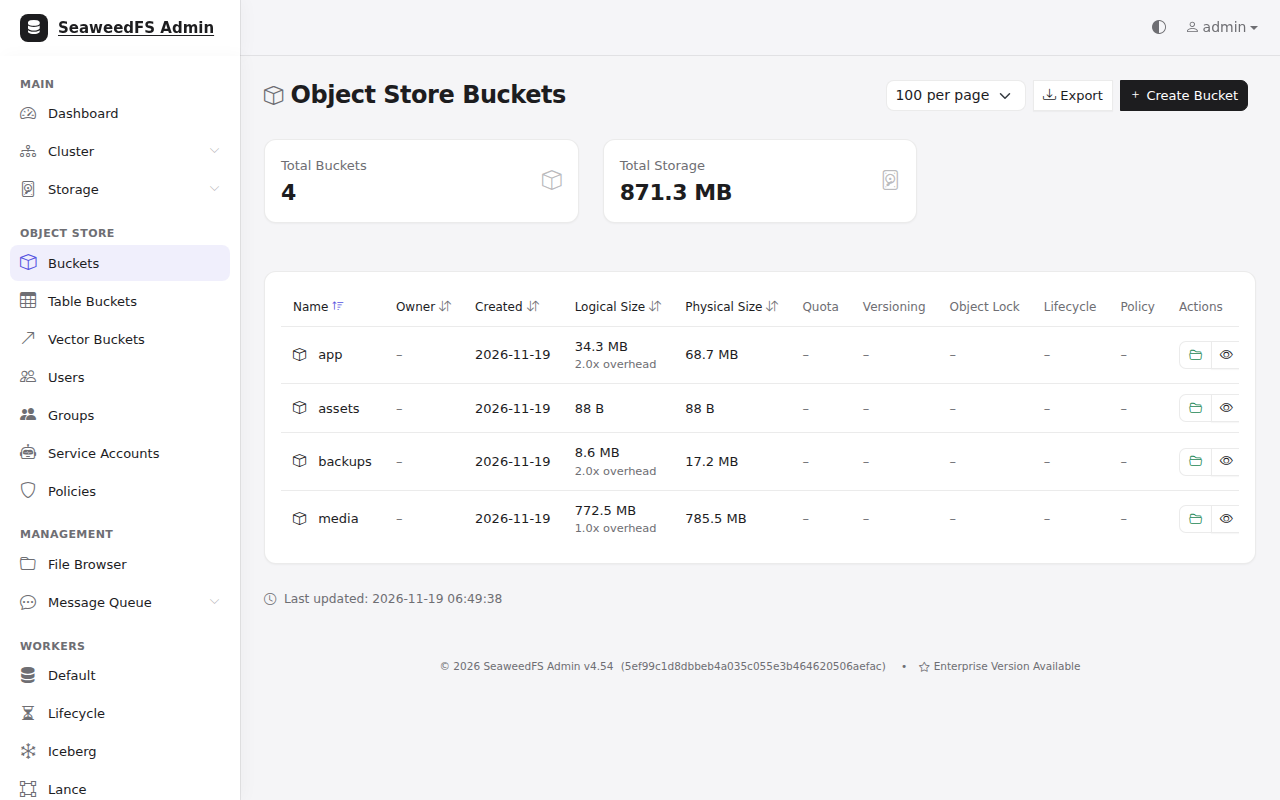
The dashboard shows the volumes, disk use and the one-node cluster. Object Store has your buckets, users, access keys and policies; you can create a bucket or a user there, and see each bucket's size. File Browser shows the same objects as folders.
The admin UI has its own password because anyone you share the VM with gets past exe.dev's login, and this page can create keys for every bucket. The other private ports (the filer UI on 8888, the master on 9333, WebDAV on 7333) have no login of their own, so anyone who can reach the VM can read and change every bucket through them. Share this VM only with people you'd trust with all of its data.
Use S3 on the VM#
An app on the same VM talks to SeaweedFS directly, with no proxy in between.
Its settings are in ~/seaweedfs/app.env:
AWS_ENDPOINT_URL=http://localhost:8333
AWS_REGION=us-east-1
AWS_ACCESS_KEY_ID=…
AWS_SECRET_ACCESS_KEY=…
S3_BUCKET=app
The AWS SDKs and the AWS CLI read these variables as they are. Other tools
want the same four things: endpoint http://localhost:8333, any region
(us-east-1 is safest), the key, and path-style addressing
(force_path_style, use_path_style, s3ForcePathStyle or
addressing_style: path), since buckets aren't subdomains here.
This key can read, write, list and delete in the app bucket and nothing
else. It can't create buckets or see the others.
To check everything at once, run the test script the setup ran. It writes, reads, lists and deletes, does a multipart upload, and fetches a presigned URL:
curl -fsSLO https://exe-staging.dev/deploy/seaweedfs/s3-check.py
set -a; . ~/seaweedfs/app.env; set +a
uv run s3-check.py
s3-check.py is about 60 lines
of boto3. It ends with All checks passed.
Apps in Docker on this VM can't use localhost for the host; use
http://172.17.0.1:8333 (Docker's bridge address), which SeaweedFS listens
on too.
Reach S3 from elsewhere#
S3 clients sign every request with your secret key, in the Authorization
header. exe.dev's login page can't sit in front of that, so a private
https://my-seaweedfs.exe.xyz:8333/ answers 401 to a plain S3 client.
Self-hosted S3 explains the
choices for all three servers; here is how each one works with SeaweedFS.
| From | Endpoint | What gets you past exe.dev |
|---|---|---|
| This VM | http://localhost:8333 |
nothing to get past |
| Your laptop, scripts, other VMs (clients that can add a header) | https://my-seaweedfs.exe.xyz:8333 |
a VM token in X-Exedev-Authorization |
| Your laptop, any client | http://localhost:8333 through ssh -L |
your SSH key |
| Apps that can't add a header, browsers with presigned URLs | https://my-seaweedfs.exe.xyz |
nothing: the S3 port is public, S3 keys are the gate |
Keep it private, with a VM token#
A VM token is a bearer token for this VM
only. The client sends it in X-Exedev-Authorization; exe.dev checks it,
removes it, and passes the request on with the S3 signature untouched. The
client has to add the header after it signs the request, so the signature
doesn't cover a header SeaweedFS never sees.
On your computer, make a token (keep it like a password):
ssh exe.dev ssh-key generate-api-key --vm=my-seaweedfs --label=s3 --exp=90d
rclone adds headers after signing with --header. In
~/.config/rclone/rclone.conf:
[seaweedfs]
type = s3
provider = SeaweedFS
access_key_id = …
secret_access_key = …
endpoint = https://my-seaweedfs.exe.xyz:8333
export EXEDEV_TOKEN=…
rclone ls seaweedfs:app --header "X-Exedev-Authorization: Bearer $EXEDEV_TOKEN"
rclone copy ./photos seaweedfs:app/photos --header "X-Exedev-Authorization: Bearer $EXEDEV_TOKEN"
boto3 (Python) adds it in a before-send event, the last step before
the request leaves:
import os, boto3

s3 = boto3.client("s3", endpoint_url="https://my-seaweedfs.exe.xyz:8333")

def add_exedev_token(request, **kwargs):
    request.headers["X-Exedev-Authorization"] = "Bearer " + os.environ["EXEDEV_TOKEN"]

s3.meta.events.register("before-send.s3", add_exedev_token)
print(s3.list_objects_v2(Bucket="app").get("KeyCount"))
s3-check.py does the same when EXEDEV_TOKEN is set: copy
~/seaweedfs/app.env to your computer, change AWS_ENDPOINT_URL to
https://my-seaweedfs.exe.xyz:8333, and run it there.
The AWS CLI can't add headers by itself. A small plugin,
exedev_token.py, does it
for every S3 request when EXEDEV_TOKEN is set. Save it in a directory of
its own and point ~/.aws/config at it:
mkdir -p ~/.aws/plugins
curl -fsSL -o ~/.aws/plugins/exedev_token.py https://exe-staging.dev/deploy/seaweedfs/exedev_token.py
cat >> ~/.aws/config <<EOF

[plugins]
cli_legacy_plugin_path = $HOME/.aws/plugins
exedev_token = exedev_token

[profile seaweedfs]
endpoint_url = https://my-seaweedfs.exe.xyz:8333
region = us-east-1
s3 =
  addressing_style = path
  preferred_transfer_client = classic
EOF
If ~/.aws/config already has a [plugins] section, add the two lines to
it instead. Then:
export EXEDEV_TOKEN=… AWS_ACCESS_KEY_ID=… AWS_SECRET_ACCESS_KEY=…
aws --profile seaweedfs s3 ls s3://app/
aws --profile seaweedfs s3 cp big.iso s3://app/
preferred_transfer_client = classic matters: the faster CRT client that
aws s3 cp may pick otherwise drops headers that plugins add, and you get
401. AWS calls plugin support in AWS CLI v2
provisional,
so check it after AWS CLI upgrades.
Tested with AWS CLI 2.41, boto3 1.44 and rclone 1.76: listing, 200-300 MB
multipart uploads and downloads, and 500 small files in one rclone copy.
Uploads through the proxy ran at about 14 MB/s and downloads several times
faster.
What a token doesn't help with: apps that only take an endpoint and keys (Litestream, a registry's S3 driver, most self-hosted apps), and presigned URLs opened by someone else's browser. For those, use Tailscale or the public port.
For quick work from your laptop, an SSH tunnel needs no token and works with
every client: ssh -N -L 8333:localhost:8333 my-seaweedfs.exe.xyz, then use
http://localhost:8333 as the endpoint while it runs.
Make the S3 port public#
When apps on other servers need S3, or browsers need presigned URLs, make port 8333 the VM's public port. On your computer:
ssh exe.dev share port my-seaweedfs 8333
ssh exe.dev share set-public my-seaweedfs
The S3 API is then at https://my-seaweedfs.exe.xyz (and at :8333) with no
exe.dev login, for any S3 client. Its keys are the only gate: SeaweedFS
refuses anything unsigned or signed with an unknown key (403). The admin
UI, filer, master and WebDAV stay private; the admin UI is still at
https://my-seaweedfs.exe.xyz:8000/. A VM has one public port, so this
replaces a public web app on port 8000.
Presigned URLs from any SDK now work in any browser until they expire;
make them against https://my-seaweedfs.exe.xyz, the address the browser
will use. Presigned GET, PUT and POST form uploads were all tested.
To serve one bucket's files to anyone, such as a site's images, grant anonymous reads on that bucket alone. On the VM:
weed shell <<'EOF'
s3.bucket.create -name assets
s3.anonymous.set -bucket assets -access Read
EOF
https://my-seaweedfs.exe.xyz/assets/logo.png is then readable by anyone;
listing the bucket and writing to it still need a key. Undo it with
s3.anonymous.set -bucket assets -access none.
To go back to private: ssh exe.dev share set-private my-seaweedfs.
From other VMs over Tailscale#
An app on another of your VMs that can't add a header, and shouldn't go
through a public port, can reach S3 over your
Tailscale network. Start Tailscale on both VMs
(sudo tailscale up --hostname=$(hostname), or exe.dev's
Tailscale integration), then use
http://my-seaweedfs:8333 from the other VM. SeaweedFS listens on every
interface, and its keys still apply. We haven't tested this for this page.
Buckets and keys#
Give each app its own bucket and key, so one leaked key exposes one bucket.
weed shell on the VM manages them without any key:
weed shell <<'EOF'
s3.bucket.create -name backups
s3.user.provision -name litestream -bucket backups -role readwrite
EOF
It prints the new access key and secret key once; save them right away.
Roles are readonly, readwrite and admin, each for the one bucket.
Other commands: s3.bucket.list, s3.user.list, s3.accesskey.rotate,
s3.user.disable, s3.user.delete; help lists them all. The admin UI's
Users and Policies pages do the same with forms.
The admin key in /etc/seaweedfs/seaweedfs.env can do anything, including
creating buckets with aws s3 mb. Keep it on the VM and give apps their own
keys.
The filer: files, folders, WebDAV and mounts#
SeaweedFS stores objects in volumes, and its filer keeps the names: every
bucket is a folder under /buckets, every key a path. That gives you more
ways in than S3:
-
Filer UI at
https://my-seaweedfs.exe.xyz:8888/buckets/: browse, upload and delete, like a simple file manager. It has no login of its own beyond exe.dev's. -
WebDAV at
https://my-seaweedfs.exe.xyz:7333/, showing the buckets. WebDAV clients log in with Basic auth, which exe.dev accepts with a VM token as the password and any user name. rclone'swebdavbackend works that way (tested); Finder, Windows anddavfs2can too. -
FUSE mount on the VM, so programs that only know files can use your buckets (tested):
sudo mkdir -p /mnt/seaweedfs
sudo weed mount -filer=localhost:8888 -filer.path=/buckets -dir=/mnt/seaweedfs
ls /mnt/seaweedfs/applists theappbucket, and files written there are objects. Mounting from another machine needs the filer's gRPC port (18888), so only over Tailscale. -
SFTP:
weed sftpserves the filer over SFTP on port 2022. exe.dev only forwards HTTPS and its own SSH, so it's for Tailscale clients; we haven't tested it.
Why SeaweedFS for small files: each file is one entry in an append-only volume file with about 40 bytes of overhead, and the volume server keeps a 16-byte index entry per file in memory, so a read is one disk seek. Ten million 20 KB thumbnails are a few hundred volume files, not ten million files on ext4. Large files are split into chunks of a few megabytes.
Keep your data#
Everything lives in /var/lib/seaweedfs on the VM's persistent disk: the
volume files, the filer's metadata (filerldb2), users, keys and policies,
and the keys SeaweedFS uses for server-side encryption (.mini_sse_kek,
.mini_kek_passphrase). /etc/seaweedfs/seaweedfs.env holds the admin key
and password. It all survives restarts and reboots.
Disk. A new VM has a 25 GB disk, about 20 GB free. Watch it in the admin
UI's dashboard or with df -h /, and grow it before it fills:
ssh exe.dev resize my-seaweedfs --disk=200GB on your computer, then
sudo systemctl restart seaweedfs so SeaweedFS counts the new space.
Deleted objects leave garbage in volume files until SeaweedFS vacuums them,
which it does on its own once a volume is 30% garbage.
One VM is one copy. Keep a second one somewhere else: another S3 provider, or another exe.dev VM running SeaweedFS, RustFS or Garage. Don't back this store up into itself. exe.dev's VM backups (preview) copy the whole disk to an Amazon S3 bucket of yours, which also works; they can't go to this VM's own S3.
Continuous backup with weed filer.backup#
weed filer.backup follows every change in the filer and copies new and
changed objects to another S3 bucket within seconds. It doesn't copy
deletes, so an object deleted by mistake is still in the backup. Make a
bucket and a key at the other place, then, on the VM:
sudo tee /etc/seaweedfs/replication.toml >/dev/null <<'EOF'
[sink.s3]
enabled = true
endpoint = "https://backup-target.example.com"
region = "us-east-1"
bucket = "seaweedfs-backup"
directory = "/my-seaweedfs"
aws_access_key_id = "…"
aws_secret_access_key = "…"
s3_force_path_style = true
is_incremental = false
EOF
sudo chown seaweedfs:seaweedfs /etc/seaweedfs/replication.toml
sudo chmod 600 /etc/seaweedfs/replication.toml

sudo tee /etc/systemd/system/seaweedfs-backup.service >/dev/null <<'EOF'
[Unit]
Description=SeaweedFS continuous backup (weed filer.backup)
After=seaweedfs.service
Requires=seaweedfs.service

[Service]
User=seaweedfs
Group=seaweedfs
WorkingDirectory=/etc/seaweedfs
ExecStart=/usr/local/bin/weed filer.backup -filer=localhost:8888 -filerPath=/buckets -initialSnapshot
Restart=always
RestartSec=10

[Install]
WantedBy=multi-user.target
EOF
sudo systemctl daemon-reload
sudo systemctl enable --now seaweedfs-backup
journalctl -u seaweedfs-backup -f
The log shows the first copy of everything (initialSnapshot: done), then
it follows changes. For Amazon S3, leave out endpoint and set the bucket's
region. The backup target must be reachable without exe.dev login: if it's
another exe.dev VM, make its S3 port public. Tested with a second VM running
SeaweedFS as the target: 800 MB in 525 objects copied in a minute, then new
objects within seconds, deletes left alone.
The backup holds objects, not users and keys. SeaweedFS keeps those in the
filer under /etc, and weed shell can save them to a file. Do it after
adding or changing users, and copy the file off the VM along with
/etc/seaweedfs/seaweedfs.env; it contains secret keys:
weed shell <<< 'fs.meta.save -o /home/exedev/seaweedfs/iam.meta /etc'
chmod 600 ~/seaweedfs/iam.meta
fs.meta.load /path/to/iam.meta in weed shell puts them back (tested).
Restore from the backup
Restore objects#
The backup bucket has one folder per bucket under directory. Copy a
bucket back with rclone, from any machine that reaches both (here, the VM
itself, with remotes backup for the target and local for
http://localhost:8333 with the admin key):
rclone sync backup:seaweedfs-backup/my-seaweedfs/app local:app --transfers 16
rclone check backup:seaweedfs-backup/my-seaweedfs/app local:app
rclone check may say some hashes couldn't be checked: multipart objects
have no plain MD5. It compares their sizes instead. Tested: 513 objects,
800 MB, restored into a new bucket in a minute.
Restore a whole VM#
On a new VM, follow "Install by hand" up to the service, but before
starting it, copy /etc/seaweedfs/seaweedfs.env and the whole
/var/lib/seaweedfs from the old VM or a disk backup (rsync -a, as root,
keeping ownership). Start the service: the buckets, users and keys are
there. If you only have the object backup, install fresh, load
iam.meta (or recreate the users), recreate the buckets, restore the
objects as above, and restart SeaweedFS.
More than one VM#
One weed mini is one master, one volume server and one filer. SeaweedFS
scales by adding volume servers, and it can keep two or more copies of
every volume on different servers (-master.defaultReplication=001 for one
extra copy on another server; 010 and 100 spread copies over racks and
data centers). Every server has to reach the master's and each other's
gRPC ports, which exe.dev's HTTPS proxy doesn't carry, so the VMs need to
share a Tailscale network. In outline:
- On the first VM, change
-ip=127.0.0.1to its Tailscale name (-ip=my-seaweedfs) and add-master.defaultReplication=001. - On each other VM, run a volume server pointing at it:
weed volume -master=my-seaweedfs:9333 -ip=$(hostname) -dir=/var/lib/seaweedfs -max=0. - Existing volumes keep their old setting;
weed shell'svolume.fix.replicationadds the missing copies.
We haven't tested a multi-VM setup for this page; see the
replication and
production setup
wiki pages. For a cluster that survives losing the master, SeaweedFS runs
three masters with weed master -peers, which weed mini doesn't do.
Until then, the continuous backup above is the simpler second copy.
The nuts and bolts#
Shelley follows these steps when you click Deploy. Open them to do it by hand, update SeaweedFS, or fix something.
Install by hand
Create a VM#
On your computer (pick any free name; --disk is optional, the default is
25 GB):
ssh exe.dev new --name=my-seaweedfs --disk=100GB
ssh my-seaweedfs.exe.xyz
Install the weed binary#
SeaweedFS is one static binary, weed. On the VM, download release 4.54,
check it, and install it:
V=4.54; ARCH=$(dpkg --print-architecture)
cd /tmp
curl -fsSLO https://github.com/seaweedfs/seaweedfs/releases/download/$V/linux_$ARCH.tar.gz
curl -fsSLO https://github.com/seaweedfs/seaweedfs/releases/download/$V/linux_$ARCH.tar.gz.md5
echo "$(cat linux_$ARCH.tar.gz.md5)  linux_$ARCH.tar.gz" | md5sum -c
tar xzf linux_$ARCH.tar.gz weed
sudo install -m 755 weed /usr/local/bin/weed
weed version 2>&1 | grep '^version'
It prints version 30GB 4.54 …. ("30GB" is the largest volume file this
build supports; weed mini uses smaller ones.)
Keys and data directory#
SeaweedFS runs as its own system user, with its data in /var/lib/seaweedfs.
Generate the S3 admin key and the admin UI password, once:
sudo useradd --system --home-dir /var/lib/seaweedfs --shell /usr/sbin/nologin seaweedfs || true
sudo install -d -o seaweedfs -g seaweedfs -m 750 /var/lib/seaweedfs
sudo install -d -m 755 /etc/seaweedfs
if ! sudo test -f /etc/seaweedfs/seaweedfs.env; then
  sudo install -m 600 /dev/null /etc/seaweedfs/seaweedfs.env
  sudo tee /etc/seaweedfs/seaweedfs.env >/dev/null <<EOF
# S3 admin key (full access) and admin UI password (user: admin). Keep a copy.
AWS_ACCESS_KEY_ID=admin-$(openssl rand -hex 6)
AWS_SECRET_ACCESS_KEY=$(openssl rand -hex 24)
WEED_ADMIN_PASSWORD=$(openssl rand -hex 16)
EOF
fi
sudo ls -l /etc/seaweedfs/seaweedfs.env
With a key configured, SeaweedFS refuses unsigned S3 requests. Without one it would allow anyone who reaches port 8333 to do anything, so don't skip this.
Run it with systemd#
weed mini starts the master, a volume server, the filer, the S3 API,
WebDAV and the admin UI in one process, sized for one machine: it picks
the volume size and count from the free disk space, so new buckets don't
run out of volumes. The flags move the admin UI to port 8000 (the VM's
main URL), root WebDAV at the buckets so it can't read SeaweedFS's
settings, turn off the Iceberg and Lance catalogs this page doesn't use,
and opt out of SeaweedFS's anonymous usage statistics.
sudo tee /etc/systemd/system/seaweedfs.service >/dev/null <<'EOF'
[Unit]
Description=SeaweedFS (weed mini: master, volume, filer, S3, WebDAV, admin UI)
After=network-online.target
Wants=network-online.target

[Service]
User=seaweedfs
Group=seaweedfs
EnvironmentFile=/etc/seaweedfs/seaweedfs.env
ExecStart=/usr/local/bin/weed mini -dir=/var/lib/seaweedfs -ip=127.0.0.1 \
  -admin.port=8000 -admin.port.legacy=0 \
  -s3.port.iceberg=0 -s3.port.lance=0 -webdav.filer.path=/buckets \
  -master.telemetry=false
Restart=always
RestartSec=5
LimitNOFILE=65536

[Install]
WantedBy=multi-user.target
EOF
sudo systemctl daemon-reload
sudo systemctl enable --now seaweedfs
until curl -s -o /dev/null http://localhost:8333/; do sleep 1; done
curl -s -o /dev/null -w '%{http_code}\n' http://localhost:8333/
The last line prints 403: S3 is up and wants a key. journalctl -u seaweedfs shows each part starting and a summary of the ports.
| Port | What | Reached at |
|---|---|---|
| 8000 | Admin UI (password) | https://my-seaweedfs.exe.xyz/ |
| 8333 | S3 API (keys) | :8333, private until you make it public |
| 8888 | Filer UI and HTTP API | :8888, private |
| 9333 | Master UI | :9333, private |
| 9340 | Volume server | :9340, private |
| 7333 | WebDAV | :7333, private |
| 18888, 19333, 19340, 18333 | gRPC between the parts | the VM only |
Make a bucket and a key for your app#
install -d -m 700 ~/seaweedfs
if [ ! -f ~/seaweedfs/app.env ]; then
  out=$(weed shell <<'EOF'
s3.bucket.create -name app
s3.user.provision -name app -bucket app -role readwrite
EOF
  )
  ak=$(echo "$out" | awk '/^Access Key:/ {print $3}')
  sk=$(echo "$out" | awk '/^Secret Key:/ {print $3}')
  [ -n "$ak" ] && [ -n "$sk" ] || { echo "$out"; false; }
  install -m 600 /dev/null ~/seaweedfs/app.env
  cat > ~/seaweedfs/app.env <<EOF
AWS_ENDPOINT_URL=http://localhost:8333
AWS_REGION=us-east-1
AWS_ACCESS_KEY_ID=$ak
AWS_SECRET_ACCESS_KEY=$sk
S3_BUCKET=app
EOF
fi
weed shell <<< 's3.user.list'
s3.user.list shows the app user with one key and its policy.
Check it#
cd ~/seaweedfs
curl -fsSLO https://exe-staging.dev/deploy/seaweedfs/s3-check.py
set -a; . ~/seaweedfs/app.env; set +a
uv run s3-check.py
It ends with All checks passed against http://localhost:8333. Then open
https://my-seaweedfs.exe.xyz/ in a browser and sign in as admin.
Docker instead#
The official image chrislusf/seaweedfs:4.54 runs weed mini -dir=/data,
and takes the admin key from AWS_ACCESS_KEY_ID and
AWS_SECRET_ACCESS_KEY. Keep all of /data on the VM's disk: the image
stores the filer's metadata in /data/filerldb2 whatever -dir says. We
checked that it starts and serves S3 with data in a bind mount; the rest of
this page uses the binary, which is simpler to update and to read logs from.
sudo systemctl enable --now docker.service
docker run -d --name seaweedfs --restart unless-stopped \
  -p 8333:8333 -v /srv/seaweedfs:/data \
  --env-file /etc/seaweedfs/seaweedfs.env \
  chrislusf/seaweedfs:4.54
Update SeaweedFS
SeaweedFS releases about once a week; the release notes say what changed. Updating is replacing the binary and restarting, which takes the S3 API away for a few seconds. On the VM, with the version you want:
V=4.55; ARCH=$(dpkg --print-architecture)
cd /tmp && rm -f weed linux_$ARCH.tar.gz*
curl -fsSLO https://github.com/seaweedfs/seaweedfs/releases/download/$V/linux_$ARCH.tar.gz
curl -fsSLO https://github.com/seaweedfs/seaweedfs/releases/download/$V/linux_$ARCH.tar.gz.md5
echo "$(cat linux_$ARCH.tar.gz.md5)  linux_$ARCH.tar.gz" | md5sum -c
tar xzf linux_$ARCH.tar.gz weed
sudo cp /usr/local/bin/weed /usr/local/bin/weed.previous
sudo install -m 755 weed /usr/local/bin/weed
sudo systemctl restart seaweedfs
systemctl is-active seaweedfs-backup >/dev/null && sudo systemctl restart seaweedfs-backup
weed version 2>&1 | grep '^version'
Then run s3-check.py again. To go back, copy weed.previous over weed
and restart. Tested from 4.53 to 4.54. weed mini's defaults can change
between releases, so read the notes before skipping many versions.
Troubleshooting
401 Unauthorizedwith aWWW-Authenticate: Basic realm="exe.dev"header: exe.dev's proxy stopped the request before SeaweedFS saw it. The port is private and the client sent no valid VM token. Check the token hasn't expired, that it's for this VM, and, for the AWS CLI, thatpreferred_transfer_client = classicis set.403 AccessDeniedorSignatureDoesNotMatch: SeaweedFS saw the request and rejected the key or signature. Check the key pair, use path-style addressing, and make sure the token header is added after signing (rclone's--header, boto3'sbefore-send), not as a signed header.- Uploads fail with
no free volumesin the log: the disk is nearly full. Grow it and restart SeaweedFS. - The service won't start:
journalctl -u seaweedfs -n 50. A port already in use shows asbind: address already in use; something else on the VM has 8000, 8333, 8888 or 9333. - Admin UI login fails: the user is
admin, the password isWEED_ADMIN_PASSWORDin/etc/seaweedfs/seaweedfs.env. After changing it, restart SeaweedFS. - Lost an app's secret key: SeaweedFS can't show it again. Make a new
one with
weed shell <<< 's3.accesskey.rotate -h'for the options, or in the admin UI, and update the app. - Backup not copying:
journalctl -u seaweedfs-backup -n 50. The target must be reachable without exe.dev login, and its bucket must exist.
Frequently asked questions#
Is SeaweedFS a drop-in replacement for MinIO?
For most apps, yes: anything that speaks the S3 API with path-style addressing works, including the AWS CLI, boto3, rclone, multipart uploads and presigned URLs, all tested here. The admin tools differ: SeaweedFS has weed shell and its admin UI rather than mc admin. To copy data across, run rclone sync from the old store to the new one. Self-hosted S3 compares it with RustFS and Garage.
Can I use it from another server or my laptop?
Yes. S3 clients sign their requests themselves, so exe.dev's login page can't sit in front of them. Either keep the port private and have the client send a VM token in an extra header (rclone, boto3 and the AWS CLI can), or make the S3 port public and let SeaweedFS's keys guard it. Reach S3 from elsewhere shows both.
Is my data safe on one VM?
It's on the VM's persistent disk and survives restarts, but one VM is one copy. Keep a continuous backup in a second place. SeaweedFS can also replicate across volume servers on several VMs; see More than one VM.
How much disk do I need?
A new VM's disk is 25 GB, of which about 20 GB is free for data. Grow it any time with ssh exe.dev resize my-seaweedfs --disk=200GB and restart SeaweedFS so it uses the space; disk is billed by what you use, not by its size.
Why SeaweedFS rather than RustFS or Garage?
SeaweedFS is more than an S3 server: the same data is a file system you can mount, browse and reach over WebDAV, and it is built for huge numbers of small files. RustFS is the closest to MinIO, and Garage is the lightest for several machines. The comparison has the details.
Is SeaweedFS free?
Yes, under the Apache 2.0 license. Its authors also sell an enterprise edition with extra recovery and erasure coding features, which this page doesn't use. You pay for the VM; see exe.dev plans.
Published Nov 19, 2026 · Updated Nov 19, 2026 · tested end to end Nov 19, 2026 · Markdown · manifest.json · Something wrong? Tell us