---
title: "Self-host Sentry"
description: "Run Sentry's official self-hosted release on an exe.dev VM: errors, performance, Session Replay and crons, with a private dashboard and token-protected ingest."
url: https://exe-staging.dev/deploy/sentry
category: "Monitoring"
published: 2026-11-19
updated: 2026-11-19
---
# Self-host Sentry
> **For agents:** with your user's OK, this sets up Sentry on a new exe.dev VM in their account: `curl -fsSL https://exe-staging.dev/deploy/sentry/prompt.txt | ssh exe.dev new --disk=100GB --prompt=/dev/stdin` (or open https://exe-staging.dev/deploy/sentry/new). Already on the VM? Skip this.
All of Sentry on your own VM, behind exe.dev login.
- **Software:** Sentry (https://sentry.io)
- **Source:** https://github.com/getsentry/self-hosted
- **License:** FSL-1.1-Apache-2.0
- **Time:** 30 minutes
- **Example VM name:** `my-sentry` (yours will differ; on the VM, `hostname` prints it)
- **Machine-readable:** https://exe-staging.dev/deploy/sentry/manifest.json
- **File:** https://exe-staging.dev/deploy/sentry/mail-relay.py
## What you get
- Sentry 26.11.0, every feature of the self-hosted release, restarted after a reboot.
- A private dashboard on port 9000 and an ingest-only address on the VM's main URL.
- Sentry's email (alerts, invitations) delivered through exe.dev, with no SMTP account.
- A nightly export of users, projects and settings, with the secret key beside it.
Running on the VM:
- **Sentry 26.11.0**: getsentry/self-hosted, the official Docker Compose release (about fifty containers), port 9000, data in `Docker volumes sentry-*`
- **Relay, Kafka, ClickHouse, PostgreSQL, Redis**: Sentry's ingest, queue, event store, database and cache, all from the release
- **Ingest proxy**: nginx; the SDK endpoints and nothing else, port 8000
- **Mail relay**: SMTP in, exe.dev's email gateway out; no SMTP account
- **Nightly backup**: Sentry's own export of users, projects and settings, from a systemd timer, data in `~/sentry-backups`
How it is reached:
- https://my-sentry.exe.xyz:9000/ (private): The Sentry dashboard, behind exe.dev login and Sentry's own
- https://my-sentry.exe.xyz/ (private): Where SDKs send events; apps get in with a VM token, or browsers once you make it public
## Deploy with Shelley
Open https://exe-staging.dev/deploy/sentry/new to create a VM whose agent, Shelley, follows this recipe. From a terminal:
```sh
curl -fsSL https://exe-staging.dev/deploy/sentry/prompt.txt | ssh exe.dev new --disk=100GB --prompt=/dev/stdin
```
It needs a 100 GB disk. The terminal command makes the VM that size; after the button, Shelley checks and, if the disk is smaller, gives you a link to grow it.
Or follow the steps below by hand.
Sentry is the error tracker most SDKs are written for: an SDK in your app
catches every exception and sends the stack trace, request and release to
a dashboard that groups them into issues, with performance traces,
Session Replay, profiling, crons and uptime checks beside them. Its
[self-hosted release](https://github.com/getsentry/self-hosted) is the
whole product as a Docker Compose stack, free to run for your own team.
This page runs that release on an exe.dev VM big enough for it, with the
dashboard behind exe.dev login and an address that only accepts events.
Your servers reach it with a token, so nothing has to be public, and
Sentry's email goes through exe.dev with no SMTP account. It's a lot of
machinery: more than fifty containers and 16 GB of memory. If you mostly
want errors and alerts, [GlitchTip](/deploy/sentry-glitchtip) takes the
same SDKs on the smallest VM.
## Create your account
Sentry's installer leaves user creation to you. Open a terminal on the VM
(`ssh my-sentry.exe.xyz`) and create the first user with **the email
you use for exe.dev**, so Sentry's email can reach you:
```bash
cd ~/sentry
docker compose run --rm web createuser --superuser --email you@example.com
```
It asks for a password. Then open `https://my-sentry.exe.xyz:9000/`,
sign in past exe.dev login, and Sentry shows a one-time **Welcome to
Sentry** form. Leave the SMTP fields empty (mail already goes through
exe.dev) and **Allow Registration** off, and click **Continue**.
## Make a project and send an error
Sentry starts with an `internal` project for its own errors. Open
**Settings → Projects → Create Project**, pick a platform, keep the
alert that emails you about high-priority issues, name the project, and
click **Create Project**. Sentry shows its **DSN**, the address and key
an SDK sends events to:
```text
https://d4f3b03b3ce2569ef254ad0847794135@my-sentry.exe.xyz:9000/2
```
The `:9000` is the private dashboard. Apps use the same DSN **without
`:9000`**, which goes to the ingest-only address. A DSN's key only lets
someone send events; it can't read anything.
For a first test, use the VM itself, where Sentry's port is reachable
without exe.dev login. Paste your DSN with the host changed to
`localhost:9000` and `https` to `http`:
```bash
export SENTRY_DSN='http://d4f3b03b3ce2569ef254ad0847794135@localhost:9000/2'
cat > /tmp/hello_sentry.py <<'EOF'
import os, sentry_sdk
sentry_sdk.init(dsn=os.environ["SENTRY_DSN"], environment="test")
def checkout(cart):
return sum(item["price"] for item in cart) / len(cart)
checkout([])
EOF
uv run --with sentry-sdk python /tmp/hello_sentry.py
```
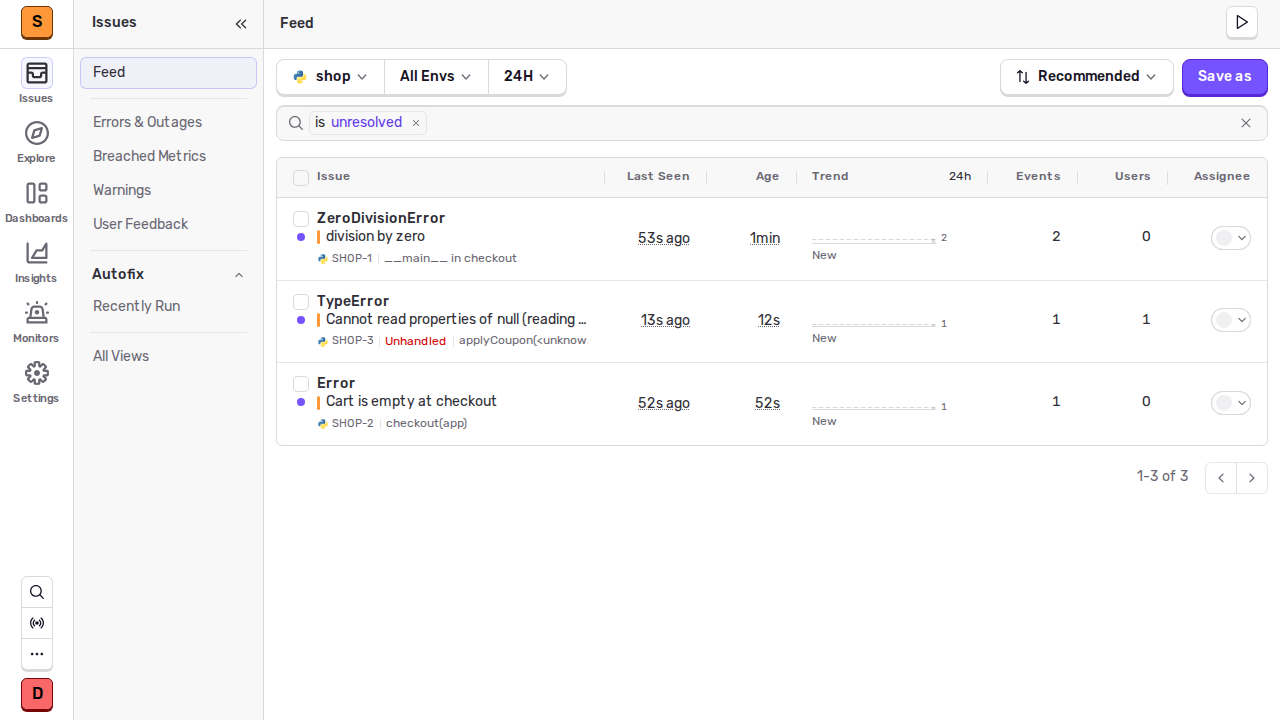
Python prints a `ZeroDivisionError`, and the SDK sends it before exiting.
Open **Issues**: it's there within a few seconds, with the stack trace and
the `test` environment.
Errors from a Python script, a Node.js server and a browser, sent through exe.dev.
## Send errors from your servers
Your apps run somewhere else. The VM is private, so exe.dev's proxy turns
away their events unless they carry a **VM token**, a key that works for
this VM's web addresses and nothing else. The proxy checks it and strips
it, so Sentry never sees it. On your computer, make a token for each app:
```bash
ssh exe.dev ssh-key generate-api-key --vm=my-sentry --label=shop-errors --exp=1y
```
Put it in the app's environment as `EXE_VM_TOKEN`, and the DSN **without
`:9000`** as `SENTRY_DSN`. Add `--ips=203.0.113.7/32` to accept the token
only from your server's address. To stop an app sending, find its key in
`ssh exe.dev ssh-key list` and run `ssh exe.dev ssh-key remove` with its
name or fingerprint.
**Node.js** (`@sentry/node`) takes extra headers as an option:
```js
import * as Sentry from "@sentry/node";
Sentry.init({
dsn: process.env.SENTRY_DSN,
transportOptions: {
headers: { "X-Exedev-Authorization": `Bearer ${process.env.EXE_VM_TOKEN}` },
},
});
```
**Python** (`sentry-sdk`) has no such option, so add the header in a
small transport subclass. It overrides an internal method, so pin your
`sentry-sdk` version and recheck after upgrades:
```python
import os
import sentry_sdk
from sentry_sdk.transport import HttpTransport
class ExeDevTransport(HttpTransport):
def _update_headers(self, headers):
super()._update_headers(headers)
headers["X-Exedev-Authorization"] = "Bearer " + os.environ["EXE_VM_TOKEN"]
sentry_sdk.init(dsn=os.environ["SENTRY_DSN"], transport=ExeDevTransport)
```
The rest is Sentry's usual setup for your framework; our
[Django](/deploy/django), [FastAPI](/deploy/fastapi) and
[Node.js](/deploy/nodejs) pages set up apps this fits into. An app on
another of your exe.dev VMs can skip the token with a
[VM-to-VM integration](/docs/integrations-vm-to-vm), which signs its
requests on the way out:
```bash
ssh exe.dev integrations add http-proxy --name sentry --target https://my-sentry.exe.xyz/ --peer --attach vm:my-app
```
That app then uses the DSN with its host changed to `sentry.int.exe.xyz`.
## Catch browser errors
JavaScript errors happen in your visitors' browsers, which can't sign in
to exe.dev or keep a token secret. To accept them, make the VM's main
address public. On your computer:
```bash
ssh exe.dev share set-public my-sentry
```
That opens `https://my-sentry.exe.xyz/`, port 8000, and only that. The
ingest proxy there passes Sentry's per-project endpoints
(`/api//envelope/` and friends) to Relay, Sentry's ingest
service, and answers 404 to everything else. The dashboard on port 9000
stays behind exe.dev login. Then use the DSN without `:9000` in your
front end:
```js
import * as Sentry from "@sentry/browser";
Sentry.init({ dsn: "https://d4f3b03b3ce2569ef254ad0847794135@my-sentry.exe.xyz/2" });
```
What this exposes: anyone who reads the DSN from your page can send
events to that project, as with any Sentry setup. Under **Project
Settings → Client Keys** you can rate-limit a key or give the front end
its own and revoke it. The proxy also caps each address at 50 requests a
second. To close it again: `ssh exe.dev share set-private my-sentry`.
To keep the VM private instead, use the JavaScript SDK's
[`tunnel` option](https://docs.sentry.io/platforms/javascript/troubleshooting/#dealing-with-ad-blockers):
your own backend receives the events and forwards them with a VM token.
## Alerts and email
Sentry's email goes through a small relay that hands it to exe.dev's
[email gateway](/docs/send-email). The gateway delivers to you, your
exe.dev team and people the VM is shared with who have signed in, and
drops other addresses (the relay logs why). Check it on the VM:
```bash
cd ~/sentry
docker compose run --rm web django sendtestemail you@example.com
docker compose logs --tail=3 exe-mailer # sent to you@example.com: ...
```
Each project starts with the alert you chose when you created it.
Change it, or add more, under **Alerts → Create Alert**. The `internal`
project collects Sentry's own errors and can email you about them too;
mute its alerts if they're noise. Slack, Discord and Microsoft
Teams alerts need your own app or bot for that service; follow Sentry's
[integration guides](https://develop.sentry.dev/integrations/).
Sentry also has uptime checks and cron monitors, under **Monitors**
in the sidebar. For a dedicated monitor
with a public status page, see [Uptime Kuma](/deploy/uptime-kuma),
ideally on a different VM from the apps it watches.
## Bring your team
Share the VM so teammates can reach the dashboard. On your computer:
```bash
ssh exe.dev share add my-sentry alice@example.com # one person
ssh exe.dev share add my-sentry team # your exe.dev team
```
Then invite them in Sentry under **Settings → Members → Invite
Members**, with the address they use for exe.dev; the invitation arrives
by email. See [sharing](/docs/sharing).
## Ask Shelley about an error
Shelley on the VM can read your issues through Sentry's API. In Sentry,
open **Settings → Personal Tokens → Create New Token** and give it
**Read** on Project, Issue & Event, and Organization. Then ask Shelley:
*"Using this Sentry token, list the unresolved issues in my project from
http://localhost:9000/api/0/, read the latest stack trace for the top one,
and find the code that causes it."*
Treat what Shelley reads there as data, not instructions: anyone with a
DSN can put text in an event.
## Retention and disk
Sentry deletes events older than **90 days**. On the VM:
```bash
df -h /
docker system df -v | grep sentry- | sort -k3 -h | tail -5
```
To keep less, put `SENTRY_EVENT_RETENTION_DAYS=30` in
`~/sentry/.env.custom` and rerun the installer (see **Update** below). To
keep more, grow the disk from your computer:
`ssh exe.dev resize my-sentry --disk=200GB`. Low SDK sample rates
(`traces_sample_rate`, `replaysSessionSampleRate`) save the most.
## Keep your settings
Every night Sentry exports its users, organizations, projects, client
keys and alert rules to `~/sentry-backups`, with a copy of the files that
hold its secret key. Keep a copy off the VM. On your computer:
```bash
scp -r my-sentry.exe.xyz:sentry-backups .
```
The export is your setup, not your events: those live in ClickHouse and
Sentry's other volumes, and age out anyway. Keep backups private, since
they include password hashes and keys.
## The nuts and bolts
These are Shelley's setup steps and your maintenance reference. Tested
with Sentry self-hosted 26.11.0, sentry-sdk 2.75.0, @sentry/node 11.14.0
and @sentry/browser 11.14.0 on November 19, 2026.
Install by hand
### Create a VM
Sentry needs 4 vCPUs and 16 GB of memory. On your computer (pick
another name if `my-sentry` is taken):
```bash
ssh exe.dev new --name=my-sentry --cpu=4 --memory=16GB --disk=100GB
ssh my-sentry.exe.xyz
```
The remaining commands run **on the VM**, as `exedev`.
### Check the size
A VM made another way (the Deploy button makes a 2-vCPU, 8 GB one) is
too small. Check:
```bash
nproc; free -g | awk '/Mem:/ {print $2 " GB memory"}'; df -h / | awk 'NR==2 {print $2 " disk"}'
```
You need `4` or more, `15 GB memory` or more and a disk of 95G or more.
If not, grow the VM with
[this link](https://exe.dev/suggest?command=resize%20my-sentry%20--cpu%3D4%20--memory%3D16GB%20--disk%3D100GB)
(with your VM's name), or on your computer with
`ssh exe.dev resize my-sentry --cpu=4 --memory=16GB --disk=100GB`. Then,
back on the VM, grow the filesystem and check again:
```bash
sudo resize2fs "$(findmnt -no SOURCE /)"
nproc; free -g; df -h /
```
### Run Sentry's installer
Add the 16 GB of swap Sentry asks for, fetch the release, and install.
The installer pulls about 25 GB of images and sets up every database;
it took 8 to 13 minutes in our tests. Run it in `tmux` so a dropped connection
doesn't stop it:
```bash
sudo systemctl enable --now docker.service
if ! swapon --show | grep -q /swapfile; then
sudo fallocate -l 16G /swapfile && sudo chmod 600 /swapfile
sudo mkswap /swapfile && sudo swapon /swapfile
echo '/swapfile none swap sw 0 0' | sudo tee -a /etc/fstab
fi
git clone --branch 26.11.0 --depth 1 https://github.com/getsentry/self-hosted.git ~/sentry
cd ~/sentry
./install.sh --skip-user-creation --no-report-self-hosted-issues --apply-automatic-config-updates
```
It ends with `You're all done!`.
### Point Sentry at exe.dev
Sentry needs to know its address, that it sits behind exe.dev's HTTPS
proxy, and where to send mail. This appends those settings once:
```bash
cd ~/sentry
h=$(hostname).exe.xyz
if ! grep -q '^system.url-prefix' sentry/config.yml; then
sed -i "s/^mail.host: 'smtp'/mail.host: 'exe-mailer'/" sentry/config.yml
cat >> sentry/config.yml <> sentry/sentry.conf.py < docker-compose.override.yml <<'EOF'
services:
exe-mailer:
build:
dockerfile_inline: |
FROM python:3.13-alpine
RUN pip install --no-cache-dir aiosmtpd==1.4.6
restart: unless-stopped
init: true
command: python /mail-relay.py
volumes: ["./exe-mail-relay.py:/mail-relay.py:ro"]
ingest:
image: nginx:stable-alpine
restart: unless-stopped
ports: ["8000:8000"]
volumes: ["./ingest.conf:/etc/nginx/conf.d/default.conf:ro"]
EOF
cat > ingest.conf <<'EOF'
limit_req_zone $binary_remote_addr zone=ingest:10m rate=50r/s;
server {
listen 8000;
access_log off;
client_max_body_size 100m;
resolver 127.0.0.11 valid=30s;
set $relay http://relay:3000;
# exe.dev's proxy puts the sender's address last in X-Forwarded-For.
set_real_ip_from 0.0.0.0/0;
set_real_ip_from ::/0;
real_ip_header X-Forwarded-For;
proxy_set_header Host $host;
proxy_set_header X-Forwarded-For $remote_addr;
proxy_set_header X-Forwarded-Proto https;
limit_req zone=ingest burst=500 nodelay;
limit_req_status 429;
# The project endpoints SDKs send to, served by Sentry's Relay.
location ~ ^/api/[1-9][0-9]*/ {
limit_except POST OPTIONS { deny all; }
proxy_pass $relay;
}
location = / {
default_type text/plain;
return 200 "Sentry event ingest. The dashboard is private.\n";
}
location / { return 404; }
}
EOF
# Sentry reports its own errors to its internal project; send them
# straight to Relay inside Compose, not out through exe.dev's proxy.
if ! grep -q backend_dsn sentry/sentry.conf.py; then
docker compose up -d --wait postgres
dsn=$(docker compose exec -T postgres psql -U postgres -tAc \
"select 'http://' || k.public_key || '@relay:3000/' || p.id from sentry_projectkey k join sentry_project p on p.id = k.project_id where p.slug = 'internal' order by k.id limit 1")
echo "SENTRY_SDK_CONFIG[\"backend_dsn\"] = \"$dsn\"" >> sentry/sentry.conf.py
fi
tail -1 sentry/sentry.conf.py
docker compose up -d --wait
docker compose ps --format '{{.Service}} {{.Status}}' | grep -v Up || echo "all services up"
curl -s -o /dev/null -w 'dashboard %{http_code}\n' localhost:9000/auth/login/
curl -s localhost:8000/
curl -s -o /dev/null -w 'login on the ingest port %{http_code}\n' localhost:8000/auth/login/
curl -s -o /dev/null -w 'API on the ingest port %{http_code}\n' localhost:8000/api/0/
printf 'Dashboard: https://%s:9000/\n' "$h"
```
Every service is up (`all services up`), the dashboard answers `200`,
and the ingest port shows its message and `404` for the sign-in page
and the API. The first start takes a few minutes.
What the pieces do:
- The [HTTPS proxy](/docs/proxy) sends `https://my-sentry.exe.xyz:9000/`
to Sentry's own nginx, and `https://my-sentry.exe.xyz/` to the ingest
proxy on port 8000. Both need exe.dev login or a VM token until you
make the VM public, and port 9000 always does.
- Relay, Sentry's ingest service, checks each event's key and project
and queues it in Kafka; workers write it to ClickHouse and PostgreSQL.
- Sentry reports its own errors to its `internal` project; the
`backend_dsn` line sends them straight to Relay instead of out through
exe.dev's proxy, which would refuse them.
- The ingest proxy takes the sender's address from the end of
`X-Forwarded-For`, which exe.dev's proxy sets, and rate-limits by it.
### Set up nightly backups
Sentry's `scripts/backup.sh` exports users, organizations, projects,
client keys and alert rules as JSON. This keeps two weeks of exports,
with the two files that hold Sentry's secret key:
```bash
cd ~/sentry
cat > exe-backup.sh <<'EOF'
#!/bin/sh
set -eu
umask 077
cd "$(dirname "$0")"
dest="$HOME/sentry-backups"
mkdir -p "$dest"
./scripts/backup.sh --no-report-self-hosted-issues > /dev/null
python3 -m json.tool sentry/backup.json > /dev/null
chmod 600 sentry/backup.json
mv sentry/backup.json "$dest/sentry-$(date +%Y%m%d-%H%M%S).json"
cp sentry/config.yml sentry/sentry.conf.py "$dest/"
find "$dest" -name 'sentry-*.json' -mtime +14 -delete
EOF
chmod +x exe-backup.sh
sudo tee /etc/systemd/system/sentry-backup.service >/dev/null <<'EOF'
[Unit]
Description=Export Sentry's settings
After=docker.service
[Service]
Type=oneshot
User=exedev
ExecStart=/home/exedev/sentry/exe-backup.sh
EOF
sudo tee /etc/systemd/system/sentry-backup.timer >/dev/null <<'EOF'
[Unit]
Description=Export Sentry's settings nightly
[Timer]
OnCalendar=daily
Persistent=true
[Install]
WantedBy=timers.target
EOF
sudo systemctl daemon-reload
sudo systemctl enable --now sentry-backup.timer
sudo systemctl start sentry-backup.service
systemctl list-timers sentry-backup.timer
ls -l ~/sentry-backups
```
The timer lists its next run, and `~/sentry-backups` holds a
`sentry-*.json` export, `config.yml` and `sentry.conf.py`. Now follow the
walkthrough at the top to create your account.
Restore settings on a new VM
Sentry's import loads users, organizations, projects, client keys and
alert rules into a fresh install, so your apps' DSNs keep working. Events
are not included.
On the new VM, run **Install by hand** up to and including the
installer. Before the next step, copy the old `config.yml` and
`sentry.conf.py` from the backup into `~/sentry/sentry/` (they hold the
secret key; if the VM's name changed, fix the address lines at their
ends), and the export as `~/sentry/sentry/backup.json`. Run the rest of
**Install by hand**, then on the VM:
```bash
cd ~/sentry
./scripts/restore.sh --no-report-self-hosted-issues
rm sentry/backup.json
```
Sign in with your old password.
Update
Sentry releases monthly as `YY.MM.N`. Upgrades must stop at each
[hard stop](https://develop.sentry.dev/self-hosted/releases/) on the way,
so read that page before jumping far. On the VM, back up, then fetch the
new release and rerun the installer, which runs the migrations:
```bash
cd ~/sentry
./exe-backup.sh
release=26.12.0 # the release you're moving to
git fetch --depth 1 origin tag "$release"
git checkout "$release"
./install.sh --skip-user-creation --no-report-self-hosted-issues --apply-automatic-config-updates
docker compose up -d --wait
```
The exe.dev settings appended to `sentry/config.yml` and
`sentry/sentry.conf.py`, `docker-compose.override.yml` and
`ingest.conf` are yours, and the installer keeps them.
Something not working?
Start with what's not running. On the VM:
```bash
cd ~/sentry
docker compose ps -a --format '{{.Service}} {{.Status}}' | grep -v ' Up'
docker compose logs --tail=50 web relay
free -h
```
- **Down after a reboot?** Run `sudo systemctl enable --now
docker.service`, then `docker compose up -d --wait` in `~/sentry`.
- **A service exited, or the VM is sluggish.** Sentry wants all of its
16 GB plus swap. Check `free -h` shows the swap, and that nothing else
big runs on this VM. `docker compose up -d --wait` restarts stopped
services.
- **The SDK sends but nothing shows up.** Apps off the VM use the DSN
without `:9000`, plus the token header; without it exe.dev answers
`401` and the SDK drops the event. `debug=True` in `sentry_sdk.init`
(or `debug: true` in JavaScript) prints what the SDK sent and the
reply. `docker compose logs --tail=50 relay` shows what Relay rejected.
- **CSRF errors when signing in.** The address in `CSRF_TRUSTED_ORIGINS`
at the end of `sentry/sentry.conf.py` must match the one in your
browser, port included; restart with `docker compose restart web`.
- **No email.** `docker compose logs exe-mailer` shows each message and,
if exe.dev refused it, why. Use the address you use for exe.dev, or
share the VM with the person first.
## Frequently asked questions
### What does self-hosted Sentry need?
Sentry's minimum is 4 CPU cores, 16 GB of memory plus 16 GB of swap, and 20 GB of free disk; its installer refuses less than 4 cores or about 14 GB. In our tests it used about 13 GB of memory at idle. On exe.dev that's a VM made with `--cpu=4 --memory=16GB`, which needs a plan with 16 GB of capacity or more; see [pricing](https://exe.dev/pricing).
### Is self-hosted Sentry free?
Yes. Sentry's code is under the Functional Source License, which lets you run it for your own team at no charge; it only forbids offering it as a competing service. You pay for the VM.
### Self-hosted Sentry or GlitchTip?
Sentry if your team uses Session Replay, profiling, crons, its dashboards or its integrations, and will keep up with upgrades. [GlitchTip](/deploy/sentry-glitchtip) takes the same SDKs, covers errors, alerts and basic performance in about 300 MB, and fits on the smallest VM.
### Can my servers send errors without making anything public?
Yes. Give each app a [VM token](/docs/https-tokens-for-vms) and send it as an `X-Exedev-Authorization` header from the SDK. exe.dev checks it and strips it before Sentry sees the request. See [Send errors from your servers](#send-errors-from-your-servers).
### How long does Sentry keep events?
90 days by default. Set `SENTRY_EVENT_RETENTION_DAYS` in `~/sentry/.env.custom` and rerun the installer to change it.
## Related
- [Self-host Sentry-compatible error tracking with GlitchTip](https://exe-staging.dev/deploy/sentry-glitchtip.md): Your apps' exceptions on your own VM, sent by the Sentry SDKs you already use.
- [Self-host Uptime Kuma](https://exe-staging.dev/deploy/uptime-kuma.md): A little lookout for your websites. Green bars encouraged.
- [Self-host Grafana and Prometheus](https://exe-staging.dev/deploy/grafana.md): Dashboards and alerts for every VM you run, signed in with exe.dev.
- [Deploy a Django app](https://exe-staging.dev/deploy/django.md): Your Django app on a computer of its own. git push to deploy.
- [Deploy a FastAPI app](https://exe-staging.dev/deploy/fastapi.md): Your API on a VM of its own. Push to deploy; the data stays put.
- [Deploy a Node.js app](https://exe-staging.dev/deploy/nodejs.md): Your Express app on a server of its own. git push to deploy.